Prototype Mesh API
Page Info
Audience: Intermediate to Advanced
Prerequisites: basic reconstruction and growth workflows
Time: 18 minutes
Output: clear mental model for prototype-based reconstruction and parameter overrides (Level 3 concept page)
The prototype mesh API is PlantGeom's high-level geometry realization layer.
It answers this question:
how should PlantGeom turn node attributes such as
Length,Width,Thickness, angles, and per-organ shape parameters into an actual 3D geometry?
If you are already comfortable creating Geometry, PointMappedGeometry, or ExtrudedTubeGeometry objects by hand, you do not need prototypes for those one-off/manual cases. Prototypes are useful when you want PlantGeom to apply the same geometry logic consistently across many nodes during:
MTG reconstruction
growth loops with
emit_*andrebuild_geometry!repeated realizations of the same organ type with per-node parameter changes
Why use prototypes instead of RefMesh directly?
RefMesh and prototypes do not play the same role.
RefMeshis the shared geometry asset: one canonical mesh, reused many times.a prototype is the realization rule: it tells PlantGeom how that asset should be interpreted when building node geometry.
Use a plain RefMesh directly when:
you are assigning
node[:geometry]manuallyyou want total low-level control
you do not need PlantGeom to interpret node attributes for you
Use a prototype when:
organ size comes from
Length,Width,Thicknessshape parameters may vary from node to node
you want deterministic ordering of scaling, deformation, and pose
you want the same mesh logic to work in both reconstruction and growth workflows
That distinction is the main reason the API exists.
What prototypes solve
Without prototypes, users can easily mix up:
when scaling is applied
when bending/twisting is applied
whether a mesh is treated as normalized or as already physical
where per-node overrides should live
The prototype pipeline makes that order fixed and explicit:
resolve the prototype for the node
resolve parameters using this precedence: call overrides > node overrides > node attributes > prototype defaults
build local prototype geometry
apply intrinsic shape transforms
apply size from node attributes (
Length,Width,Thickness)apply physical deformation
apply pose from reconstruction/topology
This means users no longer have to guess whether, for example, leaf bending happens before or after scaling. PlantGeom decides it once and applies it consistently.
Quick chooser
| If you want to... | Use |
|---|---|
| Reuse one mesh shape and scale it from node size attributes | RefMeshPrototype |
| Reuse one normalized mesh and deform it with point maps driven by parameters | PointMapPrototype |
| Generate geometry procedurally from a builder function | ExtrusionPrototype |
| Use an imported mesh exactly as it is in the file | RawMeshPrototype |
| Assign one geometry object manually for debugging or full control | direct Geometry, PointMappedGeometry, ExtrudedTubeGeometry |
Prototype types
RefMeshPrototype
Use this when you already have a reference mesh with the right organ shape, and the main thing PlantGeom must do is scale it from node attributes.
Typical use:
stem meshes
simple leaf meshes
organs whose final geometry mainly differs by size and pose
PointMapPrototype
Use this when you start from a normalized reference mesh, but the final shape depends on per-node parameters.
Typical use:
leaves that bend differently with age or rank
organs with twist, roll, or midrib-driven deformation
shape families that share one base lamina but vary parametrically
ExtrusionPrototype
Use this when the geometry should be built procedurally rather than by deforming a pre-existing reference mesh.
Typical use:
procedural axis/tube builders
organ families defined by control points or generated paths
geometry that is better expressed as a builder than as a reusable mesh
RawMeshPrototype
Use this when the imported mesh dimensions are already physical and should not be rescaled from Length, Width, or Thickness.
This is the "use the file as-is" case.
The single mental model
All prototype kinds share the same idea:
the prototype defines the local organ shape
the MTG node defines the instance data
reconstruction/growth defines the final pose
So when you read a node, think in three layers:
prototype: what kind of organ shape is this?
node attributes: how large is it, and what are its per-organ parameters?
topology/reconstruction: where is it attached and how is it oriented in the plant?
That is the main advantage of the prototype API over manually composing transforms for every node.
Complete example
This example is fully runnable as shown. It defines one stem prototype and one parametric leaf prototype, emits a tiny plant, inspects the available parameters, and rebuilds geometry.
1. Define reusable assets and prototypes
stem_ref = RefMesh(
    "stem",
    GeometryBasics.mesh(
        GeometryBasics.Cylinder(
            Point(0.0, 0.0, 0.0),
            Point(1.0, 0.0, 0.0),
            0.5,
        ),
    ),
    RGB(0.53, 0.40, 0.28),
)

leaf_ref = lamina_refmesh(
    "leaf";
    length=1.0,
    max_width=1.0,
    n_long=36,
    n_half=7,
    material=RGB(0.18, 0.58, 0.26),
)

prototypes = Dict(
    :Internode => RefMeshPrototype(stem_ref),
    :Leaf => PointMapPrototype(
        leaf_ref;
        defaults=(base_angle_deg=42.0, bend=0.25, tip_drop=0.08),
        attr_aliases=(
            base_angle_deg=(:base_angle_deg, :BaseAngle),
            bend=(:bend, :Bend),
            tip_drop=(:tip_drop, :TipDrop),
        ),
        intrinsic_shape=params -> LaminaMidribMap(
            base_angle_deg=params.base_angle_deg,
            bend=params.bend,
            tip_drop=params.tip_drop,
        ),
    ),
)
Dict{Symbol, AbstractMeshPrototype} with 2 entries:
:Leaf => PointMapPrototype{RefMesh{String, Mesh{3, Float64, TriangleFace…
:Internode => RefMeshPrototype{RefMesh{String, Mesh{3, Float64, TriangleFace{…What is happening here:
stem_refis just a shared mesh assetRefMeshPrototype(stem_ref)tells PlantGeom to treat that asset as a normalized organ scaled from node size attributesPointMapPrototype(...)says the leaf shape is built from one shared lamina plus a parametric midrib map
2. Inspect what a prototype expects
available_parameters(prototypes[:Leaf])3-element Vector{NamedTuple}:
(name = :base_angle_deg, default = 42.0, type = Float64, aliases = (:base_angle_deg, :BaseAngle), metadata = nothing)
(name = :bend, default = 0.25, type = Float64, aliases = (:bend, :Bend), metadata = nothing)
(name = :tip_drop, default = 0.08, type = Float64, aliases = (:tip_drop, :TipDrop), metadata = nothing)This is useful when you want to know which per-node parameters the prototype can read.
3. Build a small MTG and write per-node data
plant = Node(NodeMTG(:/, :Plant, 1, 1))

axis = emit_internode!(
    plant;
    index=1,
    prototype=:Internode,
    length=0.24,
    width=0.028,
)

leaf = emit_leaf!(
    axis;
    index=1,
    prototype=:Leaf,
    prototype_overrides=(bend=0.42,),
    length=0.34,
    width=0.055,
    thickness=0.010,
    offset=0.82 * axis[:Length],
    phyllotaxy=180.0,
    y_insertion_angle=52.0,
    tip_drop=0.12,
)

(
    stored_prototype=leaf[:GeometryPrototype],
    stored_overrides=leaf[:GeometryPrototypeOverrides],
)
(stored_prototype = :Leaf, stored_overrides = (bend = 0.42,))Two things matter here:
prototype=:Leafstores which prototype should be used for that nodeprototype_overrides=(bend=0.42,)stores a node-level override for one shape parameter
The extra keyword tip_drop=0.12 is stored as a normal node attribute. Because tip_drop is listed in attr_aliases, the prototype can read it automatically.
4. Inspect the effective resolved parameters
effective_parameters(leaf, prototypes[:Leaf])(base_angle_deg = 42.0, bend = 0.42, tip_drop = 0.12)This tells you the actual parameter values that will be used after applying precedence.
In this case:
bendcomes fromGeometryPrototypeOverridestip_dropcomes from the node attributebase_angle_degfalls back to the prototype default
5. Realize geometry
rebuild_geometry!(plant, prototypes)

f = Figure(size=(760, 360))
ax1 = Axis3(f[1, 1], title="Prototype assets", perspectiveness=0.5)
plantviz!(ax1, stem_ref)
plantviz!(ax1, leaf_ref)

ax2 = Axis3(f[1, 2], title="Rebuilt geometry", perspectiveness=0.5)
plantviz!(ax2, plant, color=Dict("stem" => :tan4, "leaf" => :forestgreen))
f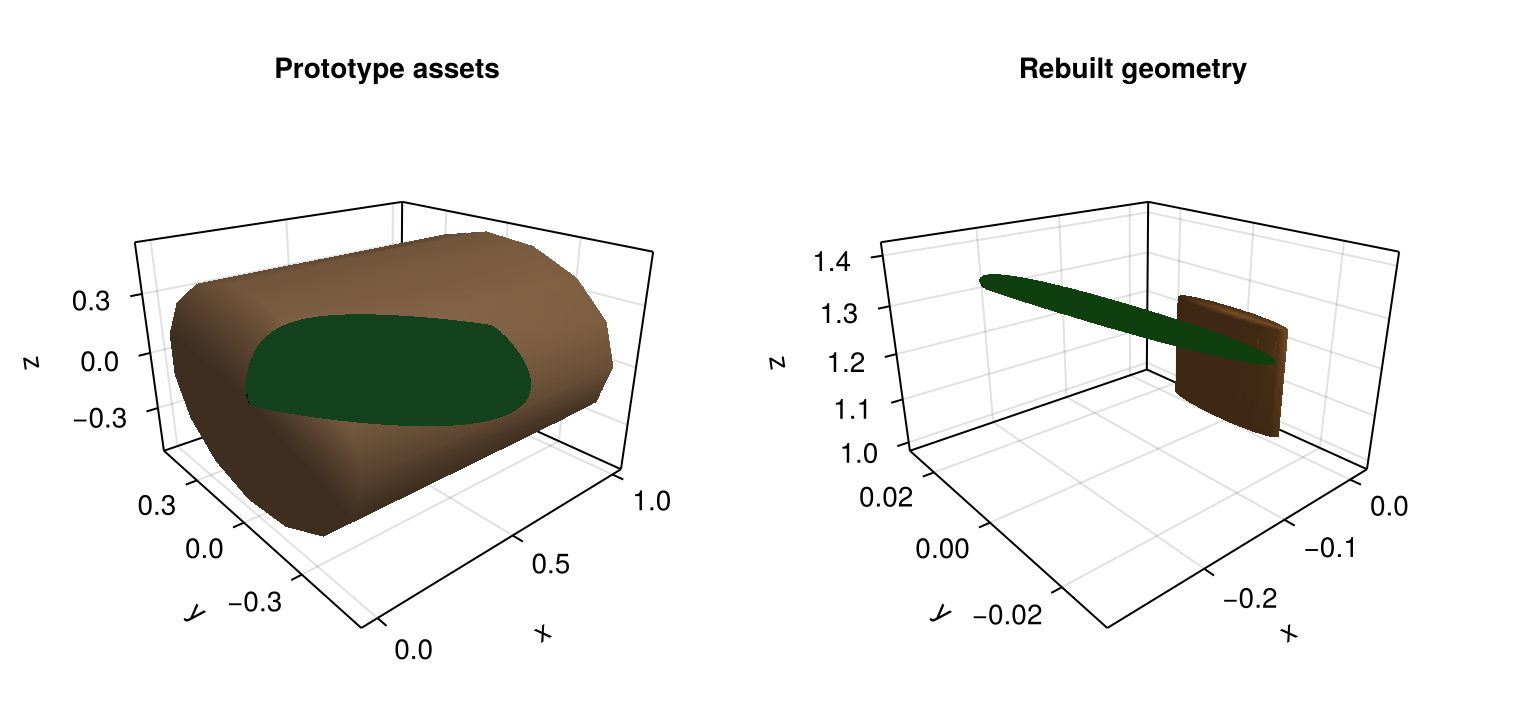
The important distinction is:
the left panel shows the reusable shared assets
the right panel shows the realized organ instances after applying node attributes and topology
Parameter precedence
For parametric prototypes, the effective parameters are resolved in this order:
call overrides passed to reconstruction
node overrides stored in
GeometryPrototypeOverridesnode attributes matched through
attr_aliasesprototype defaults
This is why the prototype API stays predictable even when a shape parameter can come from several places.
Use each layer for a different purpose:
defaults: the general organ family
node attributes: values that belong to the MTG itself
node overrides: explicit per-node exceptions
call overrides: temporary experiment-wide overrides during one rebuild
What about RefMesh and low-level geometry?
The low-level API is still available and unchanged.
If you want full manual control, you can still write:
manual_debug_plant = Node(NodeMTG(:/, :Plant, 20, 1))
manual_affine_leaf = Node(manual_debug_plant, NodeMTG(:/, :Leaf, 1, 2))
manual_pointmapped_leaf = Node(manual_debug_plant, NodeMTG(:/, :Leaf, 2, 2))

manual_affine_leaf[:geometry] = PlantGeom.Geometry(
    ref_mesh=leaf_ref,
    transformation=pose(
        rotate=(z=45.0,),
        at=(0.0, -0.22, 0.8),
        deg=true,
    ),
)

manual_pointmapped_leaf[:geometry] = PlantGeom.PointMappedGeometry(
    leaf_ref,
    compose_point_maps(
        LaminaTwistRollMap(tip_twist_deg=12.0, roll_strength=0.25),
        LaminaMidribMap(base_angle_deg=42.0, bend=0.40, tip_drop=0.12),
    );
    transformation=pose(
        rotate=(z=-18.0,),
        at=(0.0, 0.24, 0.8),
        deg=true,
    ),
)

plantviz(manual_debug_plant)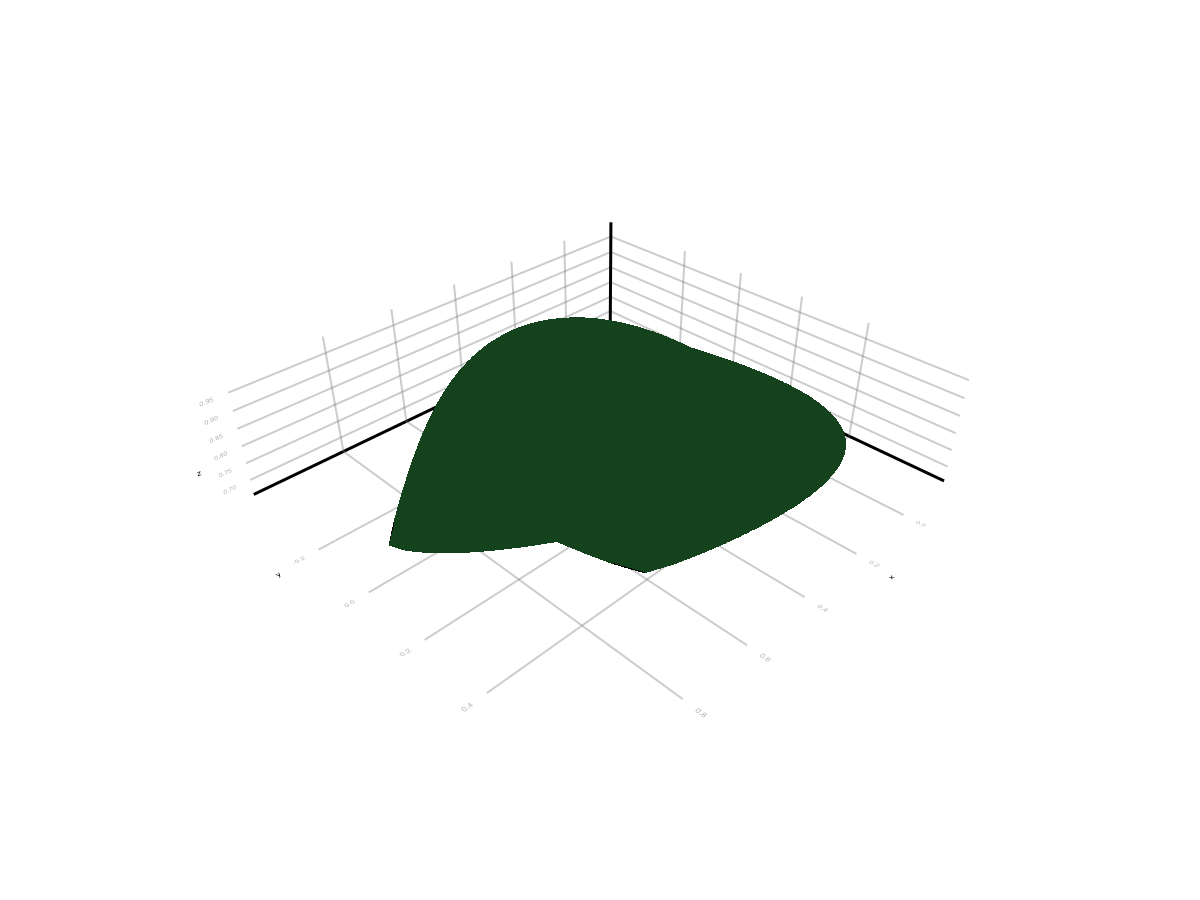
That remains the right choice when:
you are debugging a single organ
you want to inspect or prototype a transform manually
you do not want PlantGeom to infer anything from node attributes
So the recommended split is:
use prototypes for repeated, attribute-driven realization across many nodes
use direct geometry assignment for manual control and debugging
Imported mesh as-is
If a mesh already has the final physical dimensions you want, and scaling from Length, Width, and Thickness would be wrong, use RawMeshPrototype.
raw_prototypes = Dict(
    :Leaf => RawMeshPrototype(leaf_ref),
)

raw_prototypes[:Leaf]
RawMeshPrototype{RefMesh{String, GeometryBasics.Mesh{3, Float64, GeometryBasics.TriangleFace{Int64}, (:position,), Tuple{Vector{Point{3, Float64}}}, Vector{GeometryBasics.TriangleFace{Int64}}}, ColorTypes.RGB{Float64}, Vector{Vec{3, Float64}}, Nothing}}(RefMesh{String, GeometryBasics.Mesh{3, Float64, GeometryBasics.TriangleFace{Int64}, (:position,), Tuple{Vector{Point{3, Float64}}}, Vector{GeometryBasics.TriangleFace{Int64}}}, ColorTypes.RGB{Float64}, Vector{Vec{3, Float64}}, Nothing}("leaf", Mesh{3, Float64, GeometryBasics.TriangleFace{Int64}}(...), Vec{3, Float64}[[0.0, 0.0, -1.0], [0.0, 0.0, -1.0], [0.0, 0.0, -1.0], [0.0, 0.0, -1.0], [0.0, 0.0, -1.0], [0.0, 0.0, -1.0], [0.0, 0.0, -1.0], [0.0, 0.0, -1.0], [0.0, 0.0, -1.0], [0.0, 0.0, -1.0] … [0.0, 0.0, 0.0], [0.0, 0.0, 0.0], [0.0, 0.0, 0.0], [0.0, 0.0, 0.0], [0.0, 0.0, 0.0], [0.0, 0.0, 0.0], [0.0, 0.0, 0.0], [0.0, 0.0, 0.0], [0.0, 0.0, 0.0], [0.0, 0.0, 0.0]], nothing, RGB{Float64}(0.18, 0.58, 0.26), false))With RawMeshPrototype:
size attributes are ignored on purpose
pose from reconstruction still applies
the mesh is treated as an already-physical asset
When this page should change your choice
After reading this page, the intended choice should be:
if you need shared asset + size scaling, use
RefMeshPrototypeif you need shared asset + parametric deformation, use
PointMapPrototypeif you need generated local geometry, use
ExtrusionPrototypeif you need manual one-off control, stay with direct geometry assignment
if you need imported mesh dimensions preserved, use
RawMeshPrototype