Growth API with PlantSimEngine
Page Info
Audience: Intermediate
Prerequisites:
Growth APITime: 20 minutes
Output: full PlantSimEngine-driven growth example with meteo,
run!, and 3D reconstruction
This page shows the full structure-function coupling workflow:
PlantSimEngine decides when a growth event happens
PlantGeom creates the new organs with
emit_*PlantGeom later rebuilds the geometry with
rebuild_geometry!
The point of this workflow is to keep the responsibilities separate:
PlantSimEngine owns statuses, model execution, meteorology, and
run!PlantGeom owns topology edits and geometry metadata
What this example does
We build a very small dynamic plant model where:
a
:Scenenode accumulates thermal time from meteorologyeach internode emits one new internode/leaf pair once enough thermal time has accumulated
the growth event is implemented inside a PlantSimEngine model using
emit_internode_leaf!after the simulation, we rebuild geometry and visualize the result
This example is fully runnable as shown.
1. Load packages
using PlantGeom
using PlantSimEngine
using PlantSimEngine.Examples
using MultiScaleTreeGraph
using GeometryBasics
using CairoMakie
using Colors
2. Define geometry prototypes
These prototypes are used only after the simulation, when we materialize geometry from the MTG attributes.
stem_ref = RefMesh(
    "stem",
    GeometryBasics.mesh(
        GeometryBasics.Cylinder(
            Point(0.0, 0.0, 0.0),
            Point(1.0, 0.0, 0.0),
            0.5,
        ),
    ),
    RGB(0.56, 0.43, 0.30),
)

leaf_ref = lamina_refmesh(
    "leaf";
    length=1.0,
    max_width=1.0,
    n_long=30,
    n_half=6,
    material=RGB(0.18, 0.58, 0.26),
)

prototypes = Dict(
    :Internode => RefMeshPrototype(stem_ref),
    :Leaf => PointMapPrototype(
        leaf_ref;
        defaults=(base_angle_deg=40.0, bend=0.24, tip_drop=0.07),
        attr_aliases=(
            base_angle_deg=(:base_angle_deg, :BaseAngle),
            bend=(:bend, :Bend),
            tip_drop=(:tip_drop, :TipDrop),
        ),
        intrinsic_shape=params -> LaminaMidribMap(
            base_angle_deg=params.base_angle_deg,
            bend=params.bend,
            tip_drop=params.tip_drop,
        ),
    ),
)
Dict{Symbol, AbstractMeshPrototype} with 2 entries:
:Leaf => PointMapPrototype{RefMesh{String, Mesh{3, Float64, TriangleFace…
:Internode => RefMeshPrototype{RefMesh{String, Mesh{3, Float64, TriangleFace{…3. Define a PlantSimEngine growth model
This is the key integration point.
The model receives TT_cu from the :Scene scale. When the thermal-time threshold is reached, it calls emit_internode_leaf! from PlantGeom. This helper adds the two organ nodes; it does not create a :Phytomer node.
PlantSimEngine.@process "plantgeom_docs_emergence" verbose = false

struct PlantGeomDocsEmergenceModel <: AbstractPlantgeom_Docs_EmergenceModel
    TT_emergence::Float64
end

PlantGeomDocsEmergenceModel(; TT_emergence=10.0) = PlantGeomDocsEmergenceModel(TT_emergence)

PlantSimEngine.inputs_(::PlantGeomDocsEmergenceModel) =
    (TT_cu=PlantSimEngine.Required(Float64),)
PlantSimEngine.outputs_(::PlantGeomDocsEmergenceModel) = (TT_cu_emergence=0.0, emitted=0,)

function PlantSimEngine.run!(
    m::PlantGeomDocsEmergenceModel,
    status,
    environment,
    constants,
    context,
)
    if status.emitted == 0 && status.TT_cu - status.TT_cu_emergence >= m.TT_emergence
        # Count the number of internodes already emitted to alternate phyllotaxy:
        runtime = PlantSimEngine.runtime_model(context)
        phase = isodd(length(PlantSimEngine.model_objects(runtime; scale=:Internode))) ?
                180.0 : 0.0
        emit_internode_leaf!(
            status,
            context;
            internode=(
                length=0.16,
                width=0.015,
                thickness=0.015,
                prototype=:Internode,
                initial_status=(TT_cu_emergence=status.TT_cu, emitted=0),
            ),
            leaf=(
                length=0.24,
                width=0.050,
                thickness=0.008,
                offset=0.12,
                phyllotaxy=phase,
                y_insertion_angle=54.0,
                prototype=:Leaf,
                prototype_overrides=(bend=0.32, tip_drop=0.10),
            ),
            internode_index=1,
            leaf_index=1,
            bump_scene=false,
        )

        status.TT_cu_emergence = status.TT_cu
        status.emitted = 1
    end

    return nothing
end
What this model is doing:
each internode can emit only once (
status.emitted == 0)the growth trigger is purely functional:
TT_cu - TT_cu_emergence >= TT_emergencethe new organs are created through the PlantGeom API, not by calling
add_organ!manually
4. Build the initial MTG
We start from a very small graph:
one
:Sceneone
:Plantone initial
:Internodeone initial
:Leaf
mtg = Node(NodeMTG(:/, :Scene, 1, 0))
plant = Node(mtg, NodeMTG(:+, :Plant, 1, 1))

internode = Node(plant, NodeMTG(:/, :Internode, 1, 2))
internode[:Length] = 0.18
internode[:Width] = 0.020
internode[:Thickness] = 0.020
internode[:GeometryPrototype] = :Internode

leaf = Node(internode, NodeMTG(:+, :Leaf, 1, 2))
leaf[:Length] = 0.22
leaf[:Width] = 0.045
leaf[:Thickness] = 0.008
leaf[:Offset] = 0.13
leaf[:Phyllotaxy] = 0.0
leaf[:YInsertionAngle] = 50.0
leaf[:GeometryPrototype] = :Leaf
leaf[:GeometryPrototypeOverrides] = (bend=0.20, tip_drop=0.05)

mtg
/ 1: Scene
└─ + 2: Plant
└─ / 3: Internode
└─ + 4: Leaf5. Create the PlantSimEngine composite model
First define how MTG attributes become the initial Status of each runtime object. The callback returns the status to PlantSimEngine, which owns it in the model registry. Runtime status is not an MTG attribute.
function initial_status(node)
    data = Dict{Symbol,Any}(:node => node)
    for (key, value) in pairs(MultiScaleTreeGraph.node_attributes(node))
        data[Symbol(key)] = value
    end
    if MultiScaleTreeGraph.symbol(node) == :Internode
        data[:TT_cu_emergence] = 0.0
        data[:emitted] = 0
    end
    return PlantSimEngine.Status((; data...))
end
initial_status (generic function with 1 method)Important detail:
resolve a node's runtime status with
PlantSimEngine.model_status(model, node)recover its exact MTG node with
PlantSimEngine.source_node(model, status)the growth application will target
:Internodeobjects, including internodes registered during organogenesis
6. Define meteo and run the simulation
Here we use a very small weather series. With T = 20°C and the default ToyDegreeDaysCumulModel(T_base=10), each step contributes 10 degree-days.
meteo = Weather(
    [
        Atmosphere(T=20.0, Wind=1.0, Rh=0.65),
        Atmosphere(T=20.0, Wind=1.0, Rh=0.65),
        Atmosphere(T=20.0, Wind=1.0, Rh=0.65),
    ],
)

model = PlantSimEngine.CompositeModel(
    mtg;
    status=initial_status,
    environment=meteo,
    applications=(
        PlantSimEngine.ModelSpec(
            ToyDegreeDaysCumulModel();
            name=:degree_days,
            on=PlantSimEngine.One(scale=:Scene),
        ),
        PlantSimEngine.ModelSpec(
            PlantGeomDocsEmergenceModel(TT_emergence=10.0);
            name=:emergence,
            on=PlantSimEngine.Many(scale=:Internode),
            inputs=(
                :TT_cu => PlantSimEngine.One(
                    scale=:Scene,
                    within=PlantSimEngine.SceneScope(),
                    application=:degree_days,
                    var=:TT_cu,
                ),
            ),
        ),
    ),
)

initial_internode_status = PlantSimEngine.model_status(model, internode)
@assert PlantSimEngine.source_node(model, initial_internode_status) === internode
@assert !haskey(
    MultiScaleTreeGraph.node_attributes(internode),
    :plantsimengine_status,
)

request = PlantSimEngine.OutputRequest(
    PlantSimEngine.Many(scale=:Internode),
    :TT_cu_emergence;
    name=:internode_emergence,
    application=:emergence,
)
simulation = PlantSimEngine.run!(model; steps=3, outputs=request)

internodes = PlantSimEngine.model_objects(model; scale=:Internode)
(
    scene_TT_cu=only(PlantSimEngine.model_objects(model; scale=:Scene)).status.TT_cu,
    n_internodes=length(internodes),
    emergence_times=sort([object.status.TT_cu_emergence for object in internodes]),
)
(scene_TT_cu = 30.0, n_internodes = 4, emergence_times = [10.0, 20.0, 30.0, 30.0])At this stage, the simulation has changed the plant topology and initialized the new statuses, but geometry has not yet been rebuilt.
7. Rebuild geometry and visualize the resulting plant
rebuild_geometry!(mtg, prototypes)

plantviz(mtg)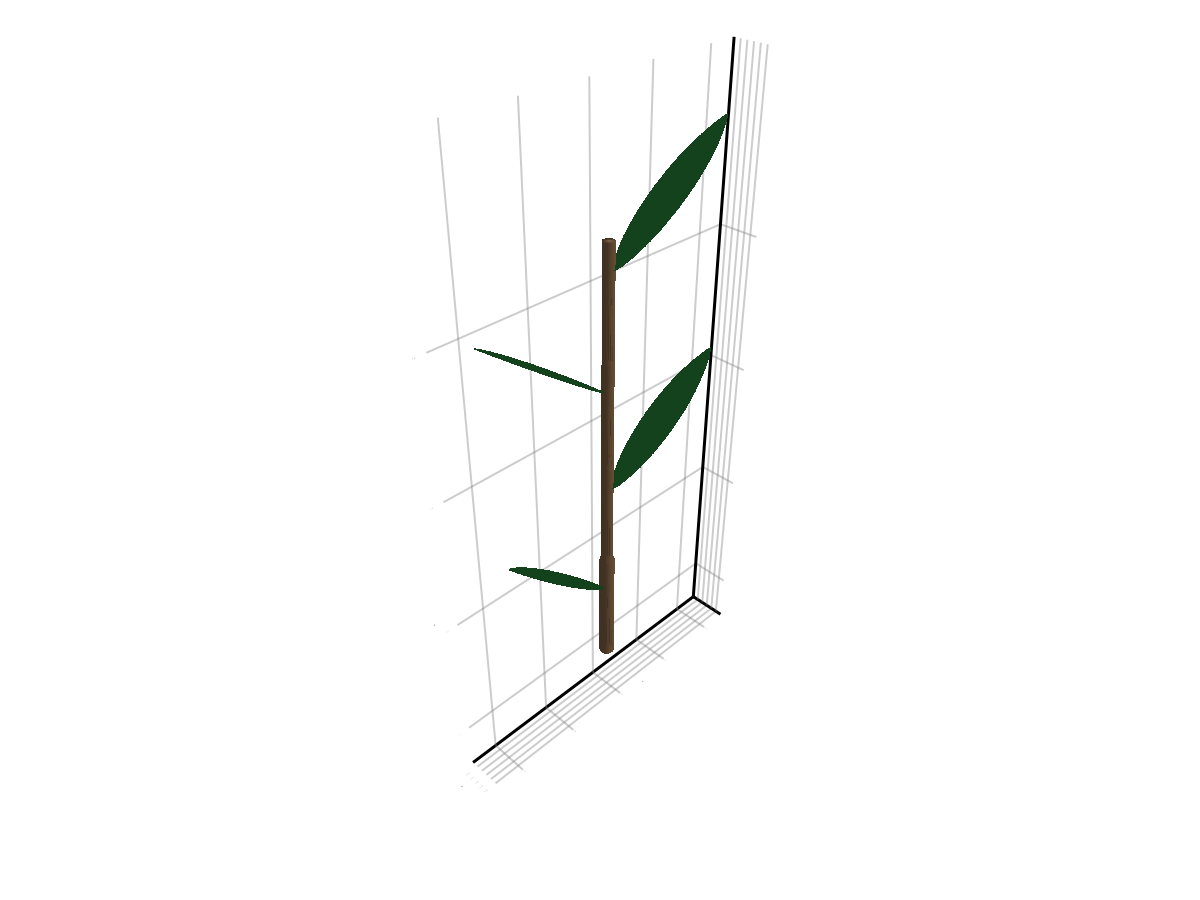
What to remember
This example shows the intended split:
PlantSimEngine models decide when growth happens
PlantGeom functions decide how new organs are created in the MTG
rebuild_geometry!remains explicit, even in a structure-function workflow
So the recommended pattern is:
write a PlantSimEngine model that triggers growth events
call
emit_internode!,emit_leaf!, oremit_internode_leaf!inside that modelrun the simulation with
PlantSimEngine.run!(model; steps=...)rebuild geometry when you want a visual or exportable 3D plant