AMAP Conventions Reference
Page Info
Audience: Beginner to Advanced
Prerequisites:
MTG Reconstruction TutorialTime: 25 minutes
Output: Full list of MTG variables, reconstruction options, and alias rules
This page is the practical reference for AMAP-style reconstruction from an MTG.
After the tutorial, users usually want to answer three questions:
Which columns can I put in my MTG?
Which of these columns are worth measuring first?
Which Julia options can I change when the default reconstruction is not enough?
This page answers those questions in that order. It is more detailed than the quickstart, but it is still meant to help you make choices, not just to list internal names.
If you have not used AMAP-style reconstruction yet, start here first:
This page focuses on which MTG columns PlantGeom can read and which reconstruction options exist. The detailed choice of explicit_coordinate_mode is handled on the next page: Explicit Coordinates: Which Option Should I Use?.
The default AMAP-style reconstruction call is:
set_geometry_from_attributes!(
    mtg,
    prototypes;
    convention=default_amap_geometry_convention(),
)
How To Read This Page
If you are new to PlantGeom, read this page in this order:
Measurement strategy: decide what you want to measure in your MTG.
MTG columns: see which columns PlantGeom can read automatically.
Julia options: change behavior with
AmapReconstructionOptions(...)only if needed.Alias tables: use them only when your imported column names differ from the defaults.
If your question is specifically about which explicit-coordinate mode to choose, read the next page after this one: Explicit Coordinates: Which Option Should I Use?.
Before the Full Reference: What Should I Actually Measure?
You do not need to measure every variable listed on this page.
In practice, most users fall into one of these three workflows:
| Your goal | Measure first | Usually enough? | Notes |
|---|---|---|---|
| Get a first recognizable 3D plant quickly | Length, Width, Thickness | yes for simple synthetic or regular plants | all organs reuse a prototype shape and are mainly distinguished by size |
| Reconstruct a measured plant with realistic attachment and orientation | previous columns + Offset, insertion angles, optionally Euler angles | yes for many MTGs | this is the standard AMAP-style workflow |
| Reconstruct from digitized 3D coordinates | explicit coordinates (XX, YY, ZZ, optionally EndX, EndY, EndZ) plus size columns | yes when coordinates are trusted | use AmapReconstructionOptions(explicit_coordinate_mode=...) |
If you are unsure where to start, use the second workflow. It is the most broadly useful one.
MTG columns vs Julia options
There are two different things on this page:
MTG columns are attributes stored on the nodes themselves, such as
Length,Width,Offset, orYInsertionAngle.Julia options are not stored in the MTG. They are passed once when calling reconstruction.
opts = AmapReconstructionOptions(
    explicit_coordinate_mode=:topology_default,
)

set_geometry_from_attributes!(
    mtg,
    prototypes;
    convention=default_amap_geometry_convention(),
    amap_options=opts,
)
This distinction matters:
if you want to describe one specific organ, add or change an MTG column on that node
if you want to change how PlantGeom interprets many nodes, use a Julia option
1. What Can I Measure in My MTG?
1.1 Smallest useful set
Use this set when you mainly want a size-driven reconstruction.
PlantGeom will take a normalized prototype for each organ type and scale it from these values.
| Variable | Meaning | Recommended? |
|---|---|---|
Length | organ length | yes |
Width | organ width | yes |
Thickness | organ thickness | recommended |
With only these variables, PlantGeom can already scale a reusable organ shape.
1.2 Standard reconstruction set
Use this set when you want a botanically structured reconstruction from topology and measurements.
This is the set most users should aim for first.
| Variable | Meaning | Recommended? |
|---|---|---|
Offset | position of a :+ organ along its bearer | yes for attached organs |
XInsertionAngle, YInsertionAngle, ZInsertionAngle | organ orientation at attachment | yes when measured |
XEuler, YEuler, ZEuler | local pose correction after insertion | optional |
BorderInsertionOffset | lateral shift on bearer cross-section | optional |
Phyllotaxy | fallback azimuth when insertion angle data are missing | optional |
This is the most common workflow for measured MTGs.
1.3 Explicit-coordinate set
Use this set when your upstream source already provides 3D coordinates, for example from digitizing, scanning, or another reconstruction pipeline.
These columns are powerful, but they are also the easiest ones to misuse if you mix them with topology-based expectations. If you are not sure, stay with the standard set above.
This page only lists the columns. The precise meaning of explicit_coordinate_mode is explained on the next page.
| Variable | Meaning | Use when |
|---|---|---|
XX, YY, ZZ | explicit start position | geometry source already provides 3D coordinates |
EndX, EndY, EndZ | explicit end position | segment endpoints are known |
Use these variables only if your data source already gives coordinates or if you deliberately want coordinate-driven reconstruction.
1.4 Advanced optional variables
These variables are usually not the first thing to measure. They are useful when you already have a working reconstruction and want to make it more faithful or more constrained.
| Variable family | Purpose |
|---|---|
InsertionMode, BorderInsertionOffset | cross-section insertion behavior |
Azimuth, Elevation | world-space orientation stages |
DeviationAngle, Orthotropy, StiffnessAngle | biomechanical / architectural bending stages |
Plagiotropy, NormalUp | projection/orientation constraints |
GeometricalConstraint | clamp direction into a geometric domain |
OrientationReset / Global | reset inherited frame |
2. Which Reconstruction Options Exist?
These options are not MTG columns. They are Julia options passed to the reconstruction call:
opts = AmapReconstructionOptions(...)

set_geometry_from_attributes!(
    mtg,
    prototypes;
    convention=default_amap_geometry_convention(),
    amap_options=opts,
)
Most users only need to know these first:
| Option | What it changes | Default |
|---|---|---|
explicit_coordinate_mode | how XX/YY/ZZ and endpoints are interpreted | :topology_default |
verticil_mode | sibling angular spread when azimuth is missing | :rotation360 |
order_override_mode | whether order maps override present values or only fill missing ones | :override |
insertion_y_by_order | default Y insertion angle by branching order | empty |
phyllotaxy_by_order | default phyllotaxy by branching order | empty |
Recommended mental model:
first, put the organ-specific measurements in the MTG
then, only if the reconstruction still does not match your data source, change one of these Julia options
For most projects:
keep
explicit_coordinate_mode=:topology_defaultunless your coordinate source clearly requires another modekeep
verticil_mode=:rotation360unless sibling spread is already fully measuredkeep
order_override_mode=:overrideonly when you really want branch-order calibration to dominate node values
If you need to decide between :topology_default, :explicit_rewire_previous, and :explicit_start_end_required, continue with Explicit Coordinates: Which Option Should I Use? after this page.
Common reconstruction recipes
| If your plant data looks like... | Put these in the MTG | Usually set these options | Why |
|---|---|---|---|
| simple measured axes and leaves | Length, Width, Thickness, Offset, insertion angles | none | this is the standard topology-driven workflow |
| same as above, but some local twist/roll is missing from prototypes | previous columns + XEuler, YEuler, ZEuler only where needed | none | Euler angles are best used as local corrections |
| digitized node positions with trusted start/end coordinates | XX, YY, ZZ, EndX, EndY, EndZ, size columns | explicit_coordinate_mode=:explicit_start_end_required | coordinates should dominate orientation |
| topology editor control points that should redirect previous segments | XX, YY, ZZ, size columns | explicit_coordinate_mode=:explicit_rewire_previous | explicit nodes act like anchors instead of visible segments |
| incomplete angle data, but branch order is known | size columns, topology columns, measured angles when available | insertion_y_by_order, phyllotaxy_by_order, maybe order_override_mode=:missing_only | branch-order rules fill or override missing architecture |
3. Detailed Variable and Alias Reference
This section is the exact reference for what PlantGeom accepts by default.
You do not need to memorize these tables. Use them when:
you are importing data and a column is not being recognized
you want to understand which aliases are accepted out of the box
you want to build a custom
GeometryConventionfrom the default one
The phrase "first matching alias wins" means that PlantGeom checks the names in order and uses the first one it finds on the node.
3.1 Geometry Convention (default_amap_geometry_convention())
These aliases describe the usual organ-local measurements: size, angles, and explicit translation.
Scale columns
| Semantic meaning | Alias lookup order | Default |
|---|---|---|
| Length | Length, length, L, l | 1.0 |
| Width | Width, width, W, w | 1.0 |
| Thickness | Thickness, thickness, Depth, depth | Width value |
Angle columns
| Semantic meaning | Alias lookup order | Frame | Unit default | Default |
|---|---|---|---|---|
| X insertion | XInsertionAngle, x_insertion_angle, xinsertionangle | Local | deg | 0 |
| Y insertion | YInsertionAngle, y_insertion_angle, yinsertionangle | Local | deg | 0 |
| Z insertion | ZInsertionAngle, z_insertion_angle, zinsertionangle | Local | deg | 0 |
| X Euler | XEuler, x_euler, xeuler | Local | deg | 0 |
| Y Euler | YEuler, y_euler, yeuler | Local | deg | 0 |
| Z Euler | ZEuler, z_euler, zeuler | Local | deg | 0 |
Translation columns
| Semantic meaning | Alias lookup order | Default |
|---|---|---|
| X translation | XX, xx | 0.0 |
| Y translation | YY, yy | 0.0 |
| Z translation | ZZ, zz | 0.0 |
3.2 AMAP Options (default_amap_reconstruction_options())
This table lists the option names, related aliases, and defaults used by the AMAP reconstruction controller.
If you are just trying to reconstruct a plant, do not start here. Start from the simpler summary above and come back only when you need to understand a specific option in detail.
| Option semantic | Default aliases / values |
|---|---|
| Insertion mode aliases | InsertionMode, insertion_mode, Insertion, insertion |
| Phyllotaxy aliases | Phyllotaxy, phyllotaxy, PHYLLOTAXY |
| Verticil mode | :rotation360 |
| Geometrical constraint aliases | GeometricalConstraint, geometrical_constraint, GeometryConstraint, geometry_constraint |
Explicit-coordinate handling mode (explicit_coordinate_mode, alias: coordinate_delegate_mode) | :topology_default (:explicit_rewire_previous, :explicit_start_end_required) |
| Azimuth aliases | Azimuth, azimuth |
| Elevation aliases | Elevation, elevation |
| Deviation aliases | DeviationAngle, deviation_angle |
| Orthotropy aliases | Orthotropy, orthotropy |
| Stiffness angle aliases | StiffnessAngle, stiffness_angle |
| Stiffness source aliases | Stifness, stifness, Stiffness, stiffness |
| Stiffness tapering aliases | StifnessTapering, stifness_tapering, StiffnessTapering, stiffness_tapering |
| Stiffness apply aliases | StiffnessApply, stiffness_apply |
| Stiffness straightening aliases | StiffnessStraightening, stiffness_straightening |
| Broken-segment aliases | Broken, broken |
| Plagiotropy aliases | Plagiotropy, plagiotropy |
| NormalUp aliases | NormalUp, normal_up |
| Orientation reset aliases | OrientationReset, orientation_reset, Global, global |
| Endpoint X aliases | EndX, end_x, endx |
| Endpoint Y aliases | EndY, end_y, endy |
| Endpoint Z aliases | EndZ, end_z, endz |
| Allometry enabled | true |
| Allometry width/height interpolation | true |
| Allometry terminal default length | 1.0 |
| Allometry terminal default width | 1.0 |
| Allometry terminal default height | 1.0 |
| Order attribute | :branching_order |
| Auto order compute | true |
| Order override mode | :override |
| Insertion-by-order map | empty Dict{Int,Float64} |
| Phyllotaxy-by-order map | empty Dict{Int,Float64} |
3.3 Topology columns (used when XX/YY/ZZ are missing)
These columns matter only when node position is reconstructed from topology instead of from explicit coordinates.
| Column | Aliases | Meaning | Default |
|---|---|---|---|
| Offset | Offset, offset | Position along bearer where + organ starts | Bearer Length |
| Border insertion offset | BorderInsertionOffset, border_insertion_offset, BorderOffset, border_offset | Lateral shift for insertion mode | Depends on mode |
| Insertion mode | InsertionMode, insertion_mode, Insertion, insertion | CENTER, BORDER (SURFACE alias), WIDTH, HEIGHT | BORDER |
| Phyllotaxy | Phyllotaxy, phyllotaxy, PHYLLOTAXY | Fallback insertion azimuth when XInsertionAngle is missing | 0 |
First matching alias wins.
4. Parameter Guide for First-Time Users
This section explains the variables in the order users usually encounter them while improving a reconstruction.
Size and scale parameters
Length, Width, and Thickness scale the reference mesh in local coordinates (+X is organ length in AMAP). If Thickness is absent, width is reused, which can make flat organs look unnaturally thick.
Example: changing a leaf from Length=0.20 to Length=0.32 stretches only the local +X axis and increases overlap with neighbors without changing insertion position.
When to use what:
Use measured organ dimensions when available.
Keep
Thicknessexplicit for leaves if your reference mesh is not already very thin.Use a single fallback width/thickness policy only for synthetic plants or quick debugging.
Insertion angles and Euler angles
Insertion angles define attachment orientation relative to the bearer; Euler angles are post-attachment local refinements.
Example: increasing YInsertionAngle from 35 to 65 lifts a leaf away from the stem axis. Adding ZEuler=20 then twists that leaf around its own axis without changing its insertion anchor.
When to use what:
Use insertion angles for phyllotaxy/branch architecture.
Use Euler angles for mesh-pose corrections (twist/roll) after topology is correct.
Avoid compensating missing insertion data with large Euler rotations, because that breaks architectural meaning.
Explicit coordinates: what the columns do
This page intentionally keeps explicit-coordinate behavior at a practical level.
When XX/YY/ZZ are present, the node has an explicit start position. When those columns are absent, PlantGeom reconstructs position from topology (Offset, insertion mode, bearer frame).
If EndX/EndY/EndZ are also present:
the node end point is explicit as well
orientation and effective
Lengthare inferred from(start -> end)angle stages are skipped for that node because the segment direction is already known
WidthandThicknessare still used normally
Use this mental model:
XX/YY/ZZanswer: where does the node start?EndX/EndY/EndZanswer: where does the node end?topology columns such as
Offsetanswer: where should the node be placed when no explicit coordinates are available?
The remaining decision is what PlantGeom should do when a node has explicit start coordinates but no explicit end coordinates. That is exactly what explicit_coordinate_mode controls, and it is explained on the next page: Explicit Coordinates: Which Option Should I Use?.
Allometry delegate semantics (AMAP core)
PlantGeom now applies AMAP-style allometry preprocessing before geometric stages:
Missing
Width/Heightcan be interpolated along:<axis neighborhoods.If only one of width/height is provided, the other is mirrored.
If a node has components (
:/), measured allometry is propagated to missing component values.Component length propagation uses AMAP split-vs-copy behavior: successor-chain components split parent
Length; direct (no-succession) components copy parentLength.For non-terminal nodes with no measured allometry, size collapses to zero (controller behavior).
Terminal nodes with missing allometry receive configurable defaults.
Missing predecessor
TopWidth/TopHeightare smoothed from next same-type successor bottom sizes.Missing complex-node allometry is accumulated from terminal components (length sum, width max).
AMAP option parameters (practical decisions)
This section is about the options that are easy to see in the output but not always easy to choose from the name alone.
InsertionMode: controls lateral insertion offset on the bearer cross-section.
CENTER: attach at section center.BORDER/SURFACE: project insertion direction to the bearer cross-section and stick to the section border.WIDTH: shift along width axis.HEIGHT: shift along height axis.
Important: these axes are in the bearer local frame (the bearer reference mesh axes), not in global/world axes.
For default_amap_geometry_convention() (length axis = local +X):
width axis is local
+Yheight axis is local
+Z(same direction as thickness/top-height semantics)
So WIDTH means a lateral shift in local Y, and HEIGHT means a lateral shift in local Z.
Use BORDER/SURFACE for "stick to bearer surface" behavior; use CENTER for neutral attachment; use WIDTH/HEIGHT when organs are known to emerge preferentially on one side of the local cross-section.
verticil_mode: controls sibling spread when XInsertionAngle is missing.
:rotation360: siblings are distributed around 360 degrees.:none: no additional spread term.
Use :rotation360 for whorled/regular sibling insertion with missing azimuth data; use :none if azimuth is already fully defined elsewhere.
order_override_mode with order maps (insertion_y_by_order, phyllotaxy_by_order):
:override: map values replace present attributes.:missing_only: map values fill only missing attributes.
Use :override for strict calibration by branch order. Use :missing_only when measured node-level values must stay authoritative.
StiffnessAngle vs Orthotropy: both bend orientation, but StiffnessAngle takes precedence if both are present.
Use StiffnessAngle when a mechanical bending angle is available; keep Orthotropy as a fallback heuristic.
OrientationReset (Global): resets the orientation basis before insertion/euler stages.
Use it when switching from inherited frame behavior to absolute local interpretation at selected nodes.
NormalUp and Plagiotropy: projection stages applied in this order.
NormalUp is mainly a robustness option for dorsiventral organs (typical leaves): it keeps the organ normal oriented toward world +Z after insertion/euler/bending stages, so leaves are less likely to end up upside-down due to noisy angles.
Practical effect:
It does not move the insertion point.
It does not redefine topology.
It adjusts orientation to keep the organ "up-facing" in world space.
Use NormalUp=true for leaf datasets where adaxial/abaxial flips appear. Add Plagiotropy only if you also need directional projection control in the insertion plane.
Why node_convention.length_axis is critical
node_convention.length_axis defines which local reference-mesh axis is considered the organ main axis.
This affects multiple stages, not just scaling:
allometry: which axis receives
Lengthinsertion frame: which direction is considered the organ direction
bending (
Orthotropy/StiffnessAngle): bending axis is derived from this main directionprojection (
NormalUp/Plagiotropy): which columns are treated as direction/secondary/normaltopology placement defaults: how "along the bearer axis" is interpreted
So if the reference mesh was authored with length on local +Z but the convention says length_axis=:x, orientation and projection can look "wrong" even with correct angle values.
Rule of thumb:
Use
default_amap_geometry_convention()(length_axis=:x) for AMAP-style meshes.Use a custom
GeometryConvention(..., length_axis=:z)when meshes are authored with length on local+Z.
Stifness / StifnessTapering propagation:
If a node has a stiffness value and
/-linked component children, PlantGeom propagates computedStiffnessAnglevalues to those components.StiffnessApply=falsedisables this propagation for that node.Positive
Stifnesspropagates downward-sign bending angles; negative values propagate upward-sign bending angles.StifnessTaperingcontrols the curvature profile (0.5default when missing).StiffnessStraightening(0..1 or 0..100) progressively damps propagated bending after that relative position.Broken(0..100) forces downstream component angles to-180after the break threshold.
What GeometricalConstraint is for
GeometricalConstraint is an envelope rule applied after angle/projection stages to keep an organ direction inside a geometric domain (cone/cylinder/plane families).
Typical use cases:
constrain synthetic roots to stay inside a soil exploration envelope
keep generated axes inside a training shape when angle data are sparse/noisy
enforce directional limits without manually tuning every node angle
Important:
it is an orientation clamp, not a full collision solver
it does not move the already computed base insertion point
for chained
:<axes, changing orientation still changes downstream positions through topology
5. Stage Order and Semantics
This is the execution order used by the AMAP-style reconstruction pipeline.
You usually do not need to think about every stage. The main reason to read this section is to understand why one variable seems to override another.
Reconstruction applies stages in this order:
Allometry preprocessing (interpolation, propagation, smoothing, complex accumulation).
Translation / topology base frame.
Endpoint override check (
EndX/EndY/EndZ).Insertion angles + insertion mode offset.
Azimuth/Elevation world orientation override.
Orthotropy/StiffnessAngle bending.
DeviationAngle world rotation.
Euler stage.
Projection stage (
NormalUp, thenPlagiotropy).Geometrical constraint stage (
GeometricalConstraint) for cone/cylinder/plane families.Stiffness propagation stage (
Stifness/StifnessTapering) writingStiffnessAngleon/components.
Key rules:
StiffnessAngletakes precedence overOrthotropy.OrientationReset=trueresets orientation basis to the AMAP base orientation for that node before insertion/euler stages.If both projection flags are enabled,
NormalUpis applied beforePlagiotropy.Geometrical constraint stage only re-orients the local basis; node base position remains topology/translation driven.
Propagated stiffness angles are written to component children before those children are reconstructed.
Explicit translation attributes keep the node position explicit; topology-based placement is used only when
XX/YY/ZZare absent.When endpoint override is active, angle stages are skipped and node
Lengthis inferred from endpoint distance.Allometry preprocessing can write inferred values back to nodes (
Length,Width,Thickness,TopWidth,TopHeight) when these are missing.
GeometricalConstraint accepted forms:
String/Symbol kind:
"cone","elliptic_cone","cylinder","elliptic_cylinder","cone_cylinder","elliptic_cone_cylinder","plane".Dict/NamedTuple with
type(orkind) and optional parameters (primary_angle,secondary_angle,radius,secondary_radius,cone_length,normal,d,origin,axis).Parameters can also be provided as node columns using aliases such as
ConstraintAngle,ConstraintRadius,ConstraintLength,ConstraintNormalX/Y/Z,ConstraintPlaneD,ConstraintOriginX/Y/Z,ConstraintAxisX/Y/Z.
6. Local vs Global Angles in GeometryConvention
This is an advanced customization section. Read it only if you are defining your own GeometryConvention.
Angle scope is controlled per entry in GeometryConvention.angle_map:
Local angle (
frame=:local): composed asT = T ∘ R.Global angle (
frame=:global): composed asT = recenter(R, pivot) ∘ T.
Global pivots:
:originAttribute tuple, e.g.
(:pivot_x, :pivot_y, :pivot_z)Numeric tuple, e.g.
(0.0, 0.0, 0.0)
Minimal example:
base = default_amap_geometry_convention()
leaf_conv = GeometryConvention(
    scale_map=base.scale_map,
    angle_map=[
        (names=[:XInsertionAngle], axis=:x, frame=:local, unit=:deg, pivot=:origin),
        (names=[:YInsertionAngle], axis=:y, frame=:local, unit=:deg, pivot=:origin),
        (names=[:Heading], axis=:z, frame=:global, unit=:deg, pivot=(:pivot_x, :pivot_y, :pivot_z)),
        (names=[:XEuler], axis=:x, frame=:local, unit=:deg, pivot=:origin),
    ],
    translation_map=base.translation_map,
    length_axis=:x,
)
7. Order-Based Defaults and Overrides
This section is useful when you do not have a complete measured angle set and want to inject branch-order rules in a controlled way.
When auto_compute_branching_order=true and no numeric order exists in order_attribute, PlantGeom computes branching_order! automatically.
Then for each node:
insertion_y_by_order[order]can overrideYInsertionAngle.phyllotaxy_by_order[order]can override the phyllotaxy fallback used whenXInsertionAngleis missing.
Override modes:
:override: map values replace attributes when available.:missing_only: map values apply only if the attribute is missing.
Effective fallback for missing XInsertionAngle:
effective_x_insertion = phyllotaxy_effective + verticil_term
verticil_mode=:rotation360(default):verticil_term = 360 * rank / totalverticil_mode=:none:verticil_term = 0
8. Option Impact Examples
The examples below show what the main options actually change in the reconstructed geometry.
Read them selectively:
InsertionModeif organs attach on the wrong side of the bearerverticil_modeif sibling organs all overlap when azimuth is missingorder overrides if your architecture should differ by branching order
explicit_coordinate_modeif your MTG containsXX/YY/ZZor endpoints
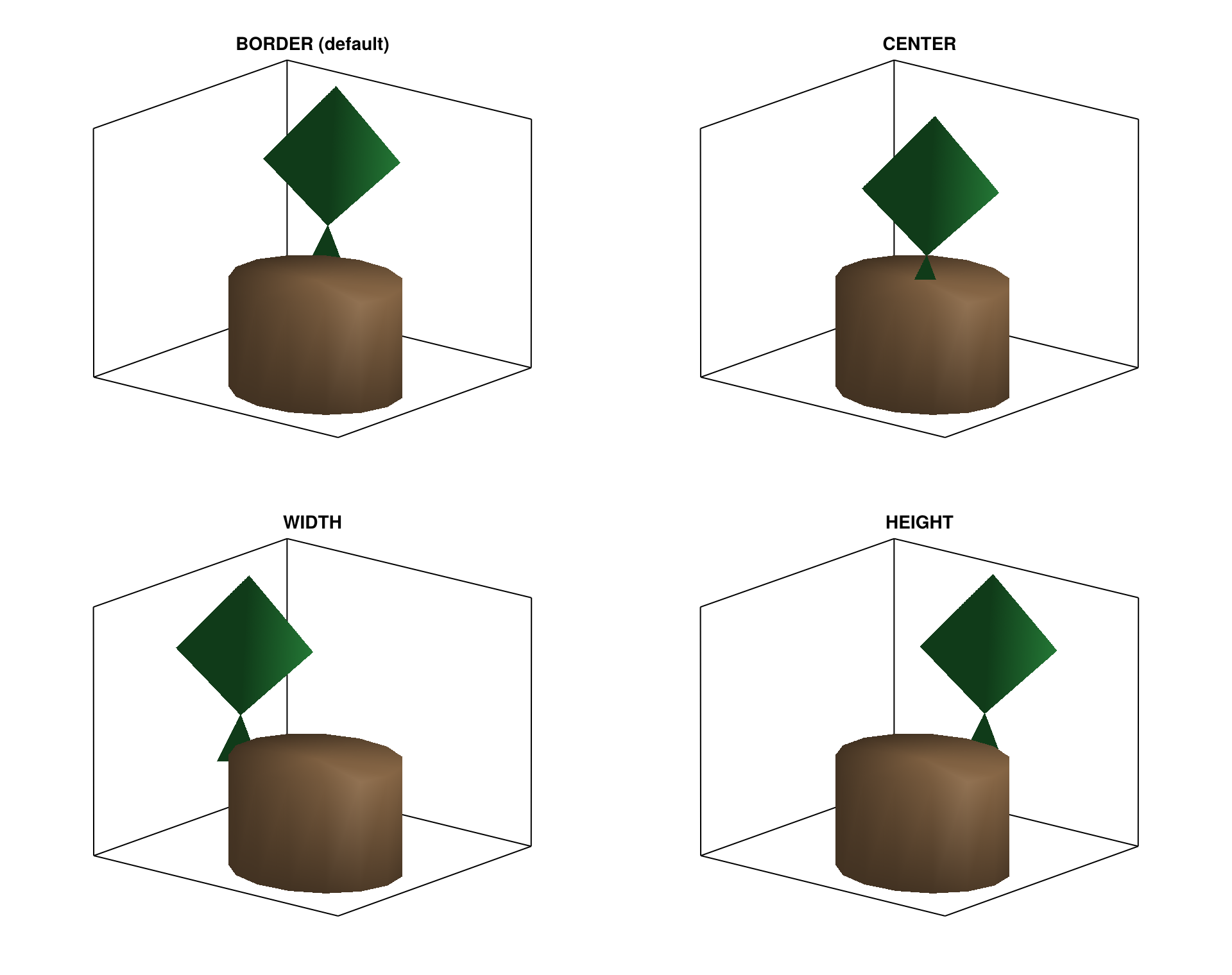
InsertionMode: BORDER (default) vs CENTER vs WIDTH vs HEIGHT
InsertionMode mainly changes where the organ base sits on the bearer cross-section. In practice, this changes self-shading and apparent clumping even if all angles stay identical.
In this example, with AMAP defaults (length=+X) and local frame = reference mesh axes, the distinction is:
BORDER: offset along the projected insertion direction, to place the organ on bearer surfaceWIDTH: offset along localYHEIGHT: offset along localZ
Use CENTER for symmetric prototypes, WIDTH when organs are known to emerge on lateral flanks, and HEIGHT when emergence is biased toward upper/lower surfaces. If you want "stick to bearer surface" behavior, use InsertionMode="BORDER" (or InsertionMode="SURFACE" alias): this follows insertion direction and projects to the bearer cross-section border.
Why the four panels differ:
All four cases use the same insertion angles and
Offsetalong the internode.Only the lateral insertion direction changes (
CENTER= none,BORDER= projected insertion direction,WIDTH= localY,HEIGHT= localZ).So the leaf keeps similar orientation, but its attachment point moves on different cross-section directions.
In this demo,
BorderInsertionOffsetis intentionally left missing so defaults are mode-dependent:BORDER -> TopWidth/2,WIDTH -> TopWidth/2,HEIGHT -> TopHeight/2.The side can appear left or right depending on orientation because WIDTH/HEIGHT pick
+axisor-axisbased on alignment with the leaf insertion direction (it is not “always +Y” or “always +Z” in screen space).
Offset and insertion mode are independent:
Offset: moves the attachment point along the internode axis (+Xhere).BORDER/WIDTH/HEIGHT: move the attachment point across the internode cross-section.
_plot_modes(
    ("BORDER", "CENTER", "WIDTH", "HEIGHT"),
    insertion_mode_example;
    titles=("BORDER (default)", "CENTER", "WIDTH", "HEIGHT"),
    size=(960, 760),
    ncols=2,
    azimuth=1.22pi,
    elevation=0.30,
    zoom_padding=0.035,
)
verticil_mode: sibling spread when XInsertionAngle is missing
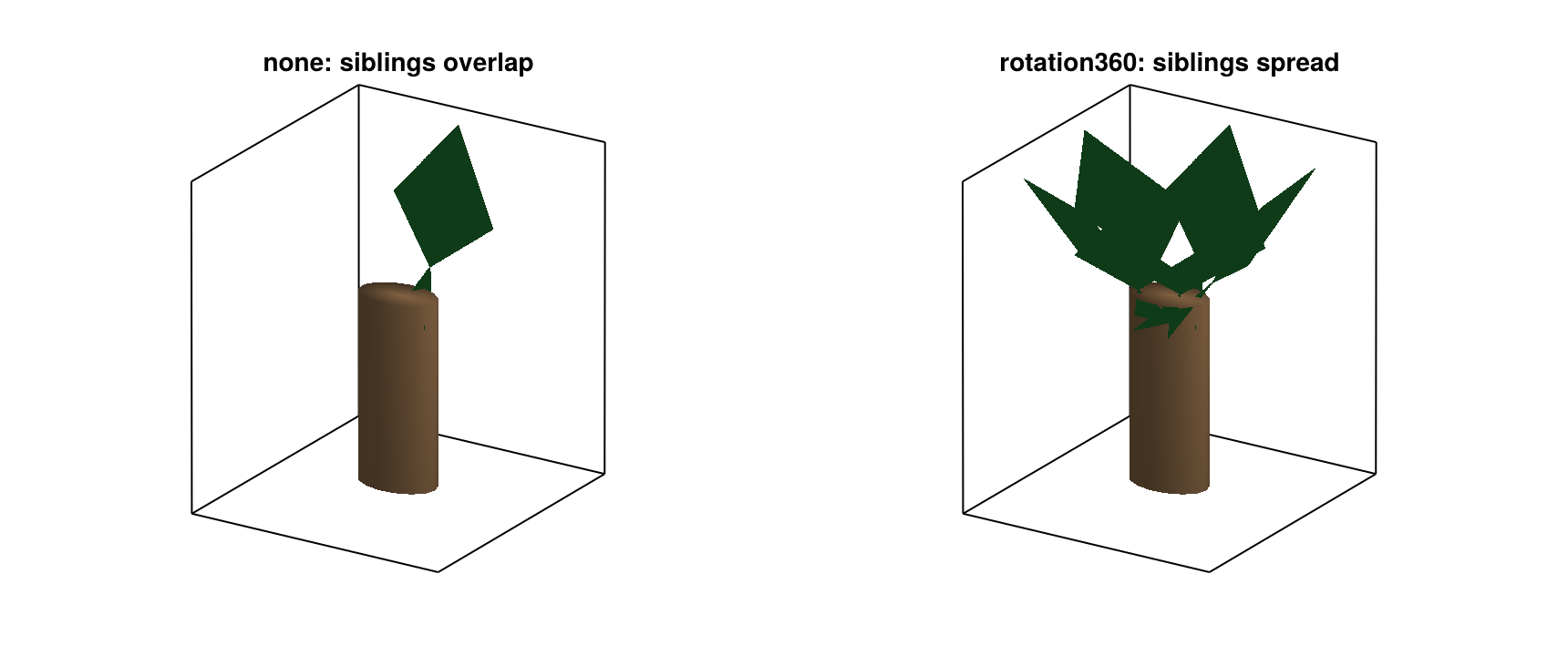
When insertion azimuth is missing, verticil_mode controls how sibling organs are separated. :rotation360 reduces overlap by design; :none keeps siblings close to the same fallback azimuth.
Use :rotation360 for regular whorls with incomplete azimuth measurements. Use :none if azimuth is already controlled by measured attributes or external rules.
What this figure is doing:
One internode has 6 sibling leaves.
Leaves intentionally have no
XInsertionAngle(to triggerverticil_modebehavior).All siblings share the same
PhyllotaxyandYInsertionAngle; onlyverticil_modediffers.
So the visible difference should be:
:none: sibling leaves keep the same fallback azimuth and overlap.:rotation360: siblings receive an additional spread term (0,60,120, ... degrees here), so they form a whorl around the bearer.
To make this easier to see, the demo uses one short bearer with 6 sibling leaves, missing XInsertionAngle, and an eccentric leaf mesh so azimuth spread is visually obvious.
_plot_modes(
    (:none, :rotation360),
    verticil_mode_example;
    titles=("none: siblings overlap", "rotation360: siblings spread"),
    size=(860, 360),
    azimuth=1.18pi,
    elevation=0.38,
    zoom_padding=0.04,
)
Order-map overrides (:override vs :missing_only)
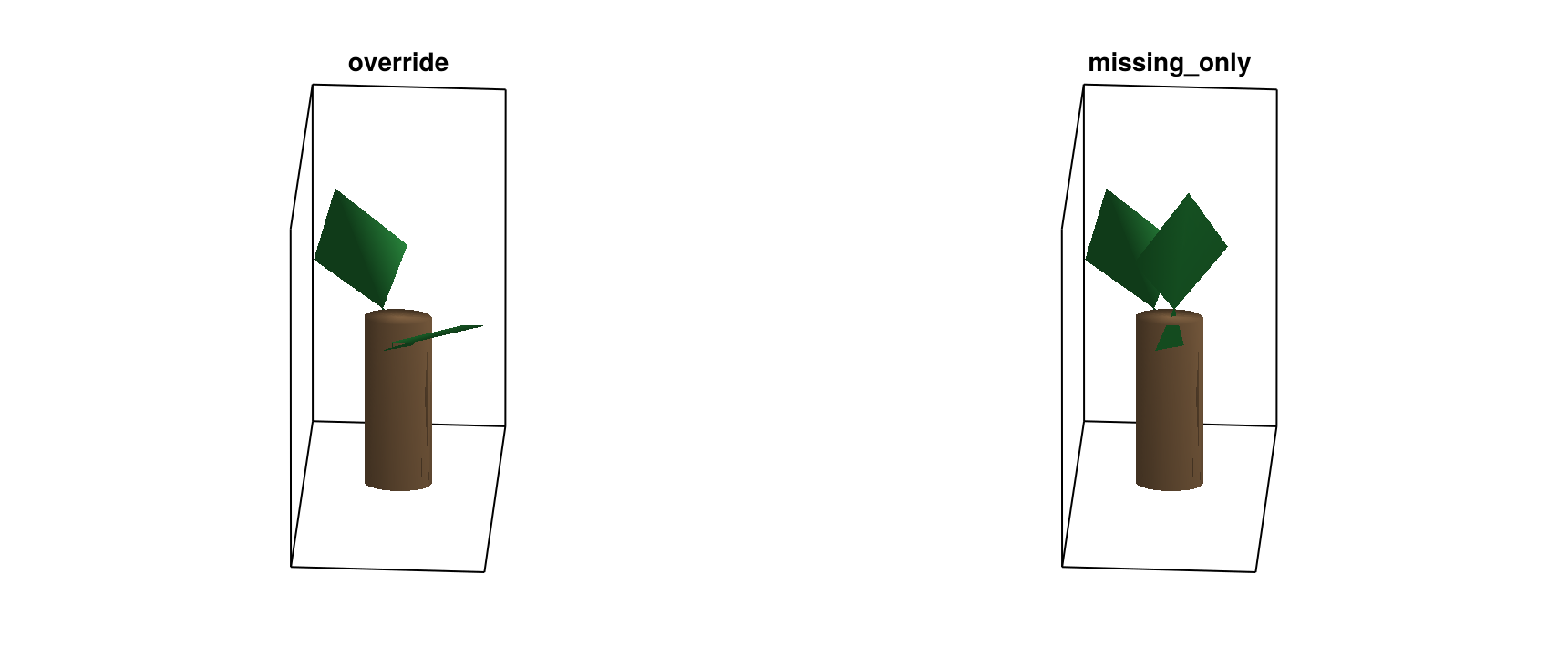
Order maps are useful for calibrated architecture classes. :override enforces class-level values everywhere; :missing_only preserves measured node attributes and only fills gaps.
Use :override for strict synthetic generators. Use :missing_only for mixed datasets where some organs are measured and others are inferred.
What this specific example does:
Two leaves share
branching_order = 2.The order map sets
insertion_y_by_order = Dict(2 => 60.0).Leaf A has no
YInsertionAnglein attributes.Leaf B has a measured
YInsertionAngle = 15.0.
So the visible difference is:
:override: both leaves use60.0, giving a symmetric high insertion posture.:missing_only: Leaf A uses60.0, Leaf B keeps15.0, giving a clearly asymmetric pair.
_plot_modes(
    (:override, :missing_only),
    order_override_example;
    size=(860, 360),
    azimuth=1.02pi,
    elevation=0.44,
    zoom_padding=0.045,
)
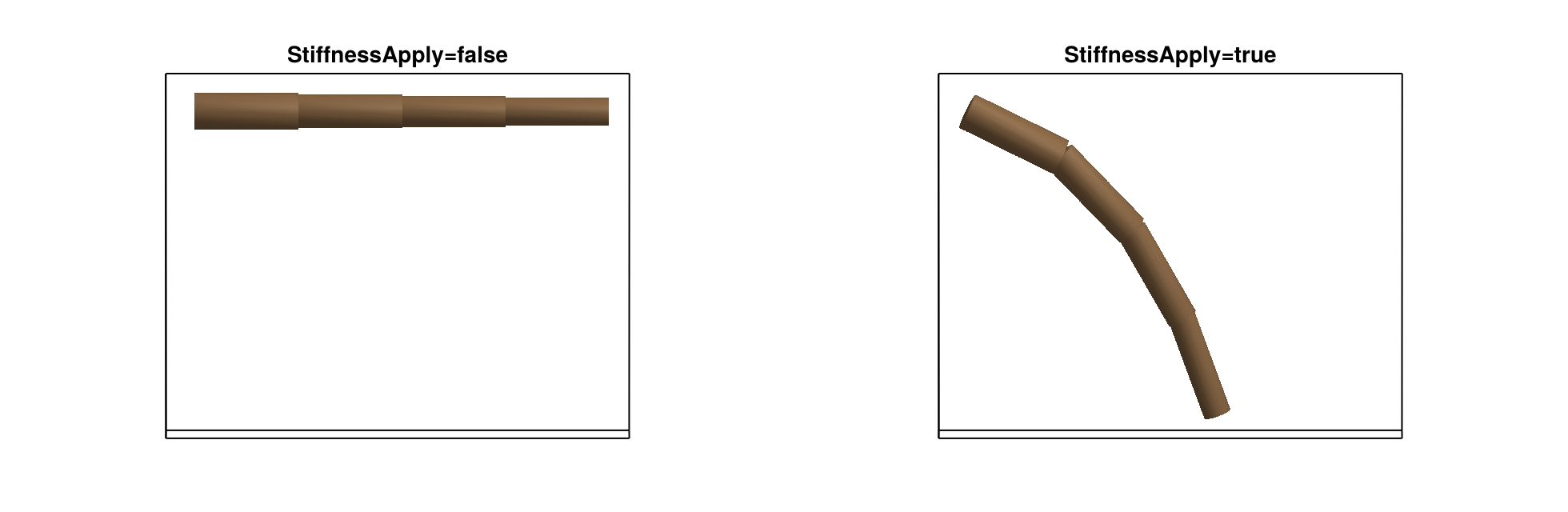
Stiffness propagation (StiffnessApply=false vs true)
This option controls whether node-level Stifness/StifnessTapering are converted into propagated StiffnessAngle values for /-linked component children.
Important: this is a component-based bending mechanism. A single undecomposed reference mesh will not be smoothly bent by this stage; you need a segmented organ representation (explicit per-segment nodes).
What this figure is doing:
Each controller node has stiffness (
Stifness,StifnessTapering) and two/components: an invisible anchor + a visible cylindrical segment.StiffnessApply=truepropagates a non-zeroStiffnessAngleto the visible component.Successor
:<nodes continue from the last component top (AMAPStudio-like behavior), so propagated component bending changes downstream position.Only
StiffnessApplychanges between panels.
Topology sketch:
AxisNode(i)
├─ / AxisDummy   (anchor, hidden)
└─ / AxisSegment (visible)
< AxisNode(i+1) starts at top(AxisSegment)
So the visible difference should be:
StiffnessApply=false: segments stay aligned.StiffnessApply=true: segments bend and the chain goes downward.
Important: like AMAPStudio, bending changes orientation, and topology controls where the next element starts. If you set explicit XX/YY/ZZ, you override this topological positioning.
_plot_modes(
    (:disabled, :propagate),
    stiffness_propagation_example;
    titles=("StiffnessApply=false", "StiffnessApply=true"),
    size=(980, 320),
    azimuth=1.5pi,
    elevation=0.20,
    zoom_padding=0.05,
)
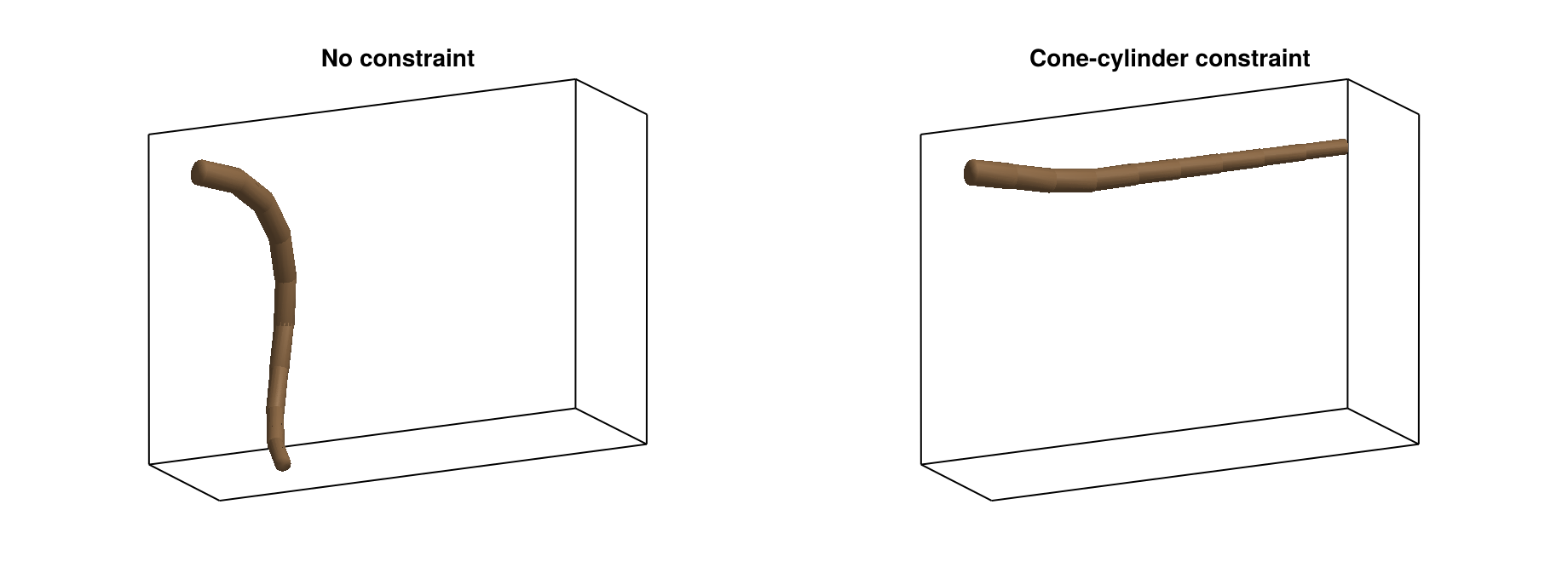
GeometricalConstraint: unconstrained vs constrained axis
This shows the practical role of GeometricalConstraint.
Left: same insertion/deviation angles, no constraint; the axis drifts away.
Right: same MTG and angles, with a shared
cone_cylinderconstraint; directions are clamped and the axis stays inside the envelope.
Use this when you want global shape control (for example root exploration domain) without hand-tuning every segment angle.
_plot_modes(
    (:free, :constrained),
    geometrical_constraint_example;
    titles=("No constraint", "Cone-cylinder constraint"),
    size=(920, 340),
    azimuth=1.35pi,
    elevation=0.26,
    zoom_padding=0.06,
)
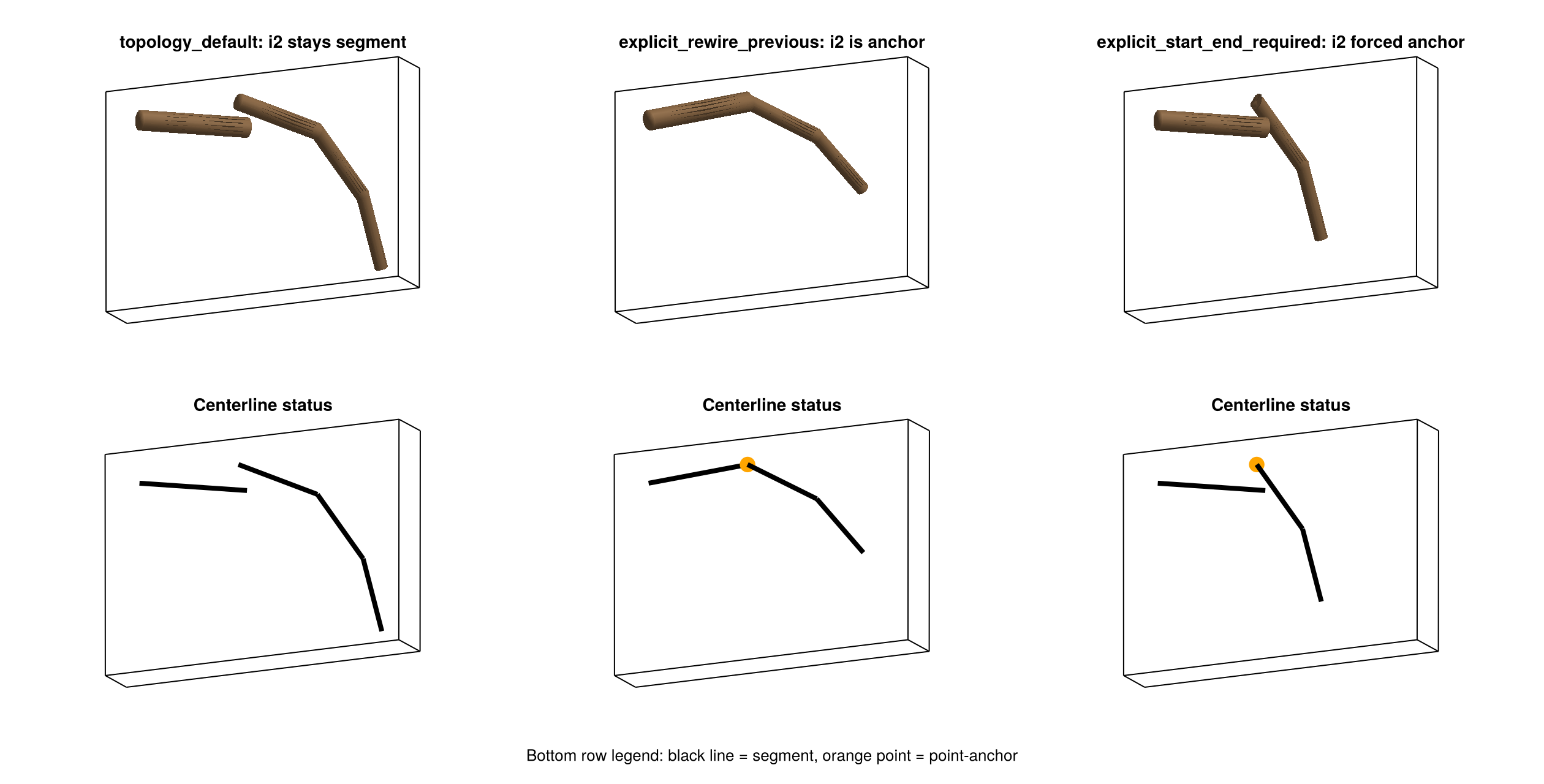
Explicit-coordinate handling mode (explicit_coordinate_mode)
This option controls how explicit start coordinates (XX/YY/ZZ) are used during reconstruction. explicit_coordinate_mode is the recommended API name, and coordinate_delegate_mode is kept as a compatible alias.
In this section, a point-anchor means a node that stays in the MTG but has zero geometric length (a point in space, no cylinder).
What changes between the three panels is mainly the reconstruction rule, not the base MTG. The same 4-internode chain and the same base attributes are used in all cases. The only mode-specific data tweak is for :explicit_start_end_required, where internode 2 is forced to Length=0 with EndX/EndY/EndZ = XX/YY/ZZ so the node stays visible as a point-anchor for side-by-side comparison.
topology_default keeps internode 2 as a normal segment that starts at XX/YY/ZZ. explicit_rewire_previous treats internode 2 as a control point: the previous segment is redirected to this point, and internode 2 itself becomes a point-anchor. explicit_start_end_required applies strict start/end logic: only nodes with a full explicit segment definition can generate a segment.
Use explicit_rewire_previous when you know coordinates for only a few nodes along a long axis. In plain terms, those measured nodes act as waypoints that pull the reconstructed axis toward known positions, while the rest of the axis is still reconstructed from topology and local geometry attributes.
_plot_coordinate_delegate_modes_with_skeleton(
    (:topology_default, :explicit_rewire_previous, :explicit_start_end_required),
    titles=(
        "topology_default: i2 stays segment",
        "explicit_rewire_previous: i2 is anchor",
        "explicit_start_end_required: i2 forced anchor",
    ),
    size=(1260, 640),
    azimuth=1.36pi,
    elevation=0.26,
    zoom_padding=0.065,
)
Numeric interpretation of the same scene (same data, same options):
for mode in (:topology_default, :explicit_rewire_previous, :explicit_start_end_required)
    _print_coordinate_delegate_mode_summary(mode)
end
mode = topology_default
internode | status | start (x,y,z) | end (x,y,z) | length
---------|--------------|----------------------|----------------------|--------
i1 | segment | (0.0, 0.0, 0.0) | (0.295, 0.0, -0.052) | 0.3
i2 | segment | (0.3, 0.06, 0.0) | (0.518, 0.06, -0.101) | 0.24
i3 | segment | (0.518, 0.06, -0.101) | (0.644, 0.06, -0.282) | 0.22
i4 | segment | (0.644, 0.06, -0.282) | (0.695, 0.06, -0.475) | 0.2
mode = explicit_rewire_previous
internode | status | start (x,y,z) | end (x,y,z) | length
---------|--------------|----------------------|----------------------|--------
i1 | segment | (0.0, 0.0, 0.0) | (0.3, 0.06, 0.0) | 0.306
i2 | point-anchor| (0.3, 0.06, 0.0) | (0.3, 0.06, 0.0) | 0.0
i3 | segment | (0.3, 0.06, 0.0) | (0.491, 0.06, -0.11) | 0.22
i4 | segment | (0.491, 0.06, -0.11) | (0.619, 0.06, -0.263) | 0.2
mode = explicit_start_end_required
internode | status | start (x,y,z) | end (x,y,z) | length
---------|--------------|----------------------|----------------------|--------
i1 | segment | (0.0, 0.0, 0.0) | (0.295, 0.0, -0.052) | 0.3
i2 | point-anchor| (0.3, 0.06, 0.0) | (0.3, 0.06, 0.0) | 0.0
i3 | segment | (0.3, 0.06, 0.0) | (0.426, 0.06, -0.18) | 0.22
i4 | segment | (0.426, 0.06, -0.18) | (0.478, 0.06, -0.373) | 0.2MTG content used in each panel (topology + key attributes):
for mode in (:topology_default, :explicit_rewire_previous, :explicit_start_end_required)
    _print_mode_mtg(mode)
end
mode = topology_default
/Plant1
^/Internode1 Length=0.3 XX=- YY=- ZZ=- EndX=- EndY=- EndZ=- status=segment
^<Internode2 Length=0.24 XX=0.3 YY=0.06 ZZ=0.0 EndX=- EndY=- EndZ=- status=segment
^<Internode3 Length=0.22 XX=- YY=- ZZ=- EndX=- EndY=- EndZ=- status=segment
^<Internode4 Length=0.2 XX=- YY=- ZZ=- EndX=- EndY=- EndZ=- status=segment
mode = explicit_rewire_previous
/Plant1
^/Internode1 Length=0.3 XX=- YY=- ZZ=- EndX=- EndY=- EndZ=- status=segment
^<Internode2 Length=0.24 XX=0.3 YY=0.06 ZZ=0.0 EndX=- EndY=- EndZ=- status=point-anchor
^<Internode3 Length=0.22 XX=- YY=- ZZ=- EndX=- EndY=- EndZ=- status=segment
^<Internode4 Length=0.2 XX=- YY=- ZZ=- EndX=- EndY=- EndZ=- status=segment
mode = explicit_start_end_required
/Plant1
^/Internode1 Length=0.3 XX=- YY=- ZZ=- EndX=- EndY=- EndZ=- status=segment
^<Internode2 Length=0.0 XX=0.3 YY=0.06 ZZ=0.0 EndX=0.3 EndY=0.06 EndZ=0.0 status=point-anchor
^<Internode3 Length=0.22 XX=- YY=- ZZ=- EndX=- EndY=- EndZ=- status=segment
^<Internode4 Length=0.2 XX=- YY=- ZZ=- EndX=- EndY=- EndZ=- status=segment