From Triangles To Voxels#
The voxel workflow is similar to the triangle workflow: read a scene, describe its materials, call run_light, then inspect or plot the result.
Keep The Same Forcing And Options#
This short comparison uses the bundled coffee triangles and synthetic voxel tree. Their shapes and plant areas differ, so their numerical results are not expected to match. The weather below is an illustrative one-hour interval.
julia
using ArchimedLight

row = (
    step_duration=3600.0,
    Ri_PAR_f=100.0, Ri_NIR_f=50.0,
    sun_azimuth=180.0, sun_elevation=35.0, direct_fraction=0.5,
)
options = LightOptions(
    toricity=false, scattering=false, turtle_sectors=6,
    all_in_turtle=true, cache_radiation=true, pixel_size=0.01,
)
LightOptions(true, 6, 0.01, true, false, 20, 0.01, 0.15, 0.3, true, false, false, AutoPixelHitStack, false, 15.0, :interval_mean, 0.0, true, false, true, true, false, nothing, false, false, nothing, true, ())
Triangles#
The existing triangle workflow stores its scene, material models and options in a LightSimulation:
julia
config = joinpath(pkgdir(ArchimedLight), "example_2", "config.yml")
sim, _ = read_simulation(config)
update_options!(sim, options)
triangle_step = run_light(sim, row)
triangle_flux = light_metric_values(triangle_step, :incident_par_flux)
length(triangle_flux)
5968
For an in-memory triangle scene, construct LightSimulation(scene, models; options) instead. Getting Started describes the complete triangle workflow.
Voxels#
read_scene recognizes .vox, .jsonl and .jsonl.gz. It returns a mutable VoxelScene containing the density grid and, where available, the original individual/organ observations. Attach a flat ground with add_ground!:
julia
example_dir = joinpath(pkgdir(ArchimedLight), "examples", "voxel_tree")
scene = read_scene(joinpath(example_dir, "tree.vox"))
leaf = VoxelMaterial(g=0.5, par_reflectance=0.08, par_transmittance=0.07,
    nir_reflectance=0.45, nir_transmittance=0.40)
soil = opaque(par=0.12, nir=0.32)
add_ground!(scene)
models = models_for(; leaf, ground=soil)
backend = VoxelCPUBackend(rays_per_voxel=4)
@assert isempty(check_models(scene, models).errors)

voxel_step = run_light(scene, row; models, options, backend)
voxel_flux = light_metric_values(scene, voxel_step, :incident_par_flux)
length(voxel_flux.value)
576
models_for supplies material properties, as it does for triangles. add_ground! creates geometry without choosing soil reflectance. On a plain .vox grid, leaf applies one material to all PAD because no organ identities are available. LightOptions holds calculation settings, independently of these materials.
scene.grid exposes the VoxelGrid; scene.terrain holds the attached ground. The soil definition uses the same opaque helper as a triangle ground model. Its par/nir values are reflectances, with zero transmission and absorption 1 - reflectance. Both workflows reflect into the outward hemisphere; triangle plant models using translucent retain their equal diffuse reflection/transmission approximation. The ground defaults to the full horizontal domain, at scene.grid.minimum[3]. Use elevation= and cells=(nx, ny) when a different level or patch resolution is appropriate. This is a flat-ground assumption, not an inferred MNT. An imported terrain can instead be supplied when constructing VoxelScene(grid; terrain=terrain).
A table of weather rows selects the series workflow automatically:
julia
rows = [row, merge(row, (Ri_PAR_f=80.0, sun_azimuth=200.0,))]
series = run_light(scene, rows; models, options, backend)
length(series)
2
The series call reuses its response and scattering-path caches between rows. all_in_turtle=true keeps every direction fixed, including the approximation of direct sunlight. With all_in_turtle=false, diffuse directions remain reusable but a new sun position needs a new directional response. Voxel caches belong to each series call; separate calls start fresh. Triangle caches belong to LightSimulation, and cache_radiation controls their reuse.
Individual And Organ Materials#
A JSONL scene retains point proportions without automatically interpreting them as plant area. Select mode=:point_proxy explicitly and provide leaf material properties before calculating:
julia
leaf = VoxelMaterial(
    g=0.5, par_reflectance=0.08, par_transmittance=0.07,
    nir_reflectance=0.45, nir_transmittance=0.40,
)
wood = VoxelMaterial(g=0.5, par_reflectance=0.10, nir_reflectance=0.30)
mixed_scene = read_scene(joinpath(example_dir, "tree.jsonl.gz"))
add_ground!(mixed_scene)
mixed_models = models_for(;
    mode=:point_proxy, leaf, wood, unknown=VoxelMaterial(g=0.5), ground=soil,
    individuals=Dict(1 => (leaf=(nir_reflectance=0.40,),)),
)
mixed_step = run_light(mixed_scene, row; models=mixed_models, options, backend)
component_values(mixed_step; level=:individual)
(individual_id = Union{Nothing, Int64}[1, 1], organ = [:wood, :leaf], plant_area = [9.095638547567178, 69.62074692810458], Ri_PAR_0_f = [48.72920609455153, 44.47238850129524], Ri_NIR_0_f = [24.364603047275764, 22.23619425064762], Ri_PAR_f = [48.72920609455153, 44.47238850129524], Ri_NIR_f = [24.364603047275764, 22.23619425064762], Ri_PAR_0_q = [1.5956036832454142e6, 1.1146323258493287e7], Ri_NIR_0_q = [797801.8416227071, 5.573161629246644e6], Ri_PAR_q = [1.5956036832454142e6, 1.1146323258493287e7], Ri_NIR_q = [797801.8416227071, 5.573161629246644e6], Ra_PAR_0_f = [43.85628548509637, 37.801530226100965], Ra_NIR_0_f = [17.055222133093036, 4.447238850129523], Ra_PAR_0_q = [1.4360433149208727e6, 9.474374769719297e6], Ra_NIR_0_q = [558461.289135895, 1.1146323258493284e6], Ra_PAR_f = [43.85628548509637, 37.801530226100965], Ra_NIR_f = [17.055222133093036, 4.447238850129523], Ra_PAR_q = [1.4360433149208727e6, 9.474374769719297e6], Ra_NIR_q = [558461.289135895, 1.1146323258493284e6], Ra_SW_f = [60.911507618189404, 42.24876907623049], aPPFD = [200.42322466689043, 172.75299313328142])
The defaults apply to every individual. The partial override changes only tree 1's leaf NIR reflectance; all other parameters retain their defaults. Supply a complete VoxelMaterial instead to replace that organ's whole material. Use update_models!(scene, models) when a scene should retain the configuration for subsequent calls without a models keyword. Neither form rewrites the input file. See One Tree, Two Input Files for individual overrides and Input Files And Individuals for unattributed vegetation.
Inspect And Plot With The Same Names#
Both representations accept selectors such as :incident_par_flux, :incident_par_energy and, when available, :absorbed_par_flux. Energy is in joules per step; flux is in watts per square metre of participating plant area. A source-aware series query returns a table containing all timesteps in step_number; plotting selects one with timestep=. Both representations use reduce=sum, by=... and sink=... to reduce, group and materialize queries. For attributed voxels, select individual_id=1 and organ=:leaf in place of triangle object and organ metadata. These retain the input identity and component allocation. Ground is ordinary geometry in the triangle query; voxel queries select it with domain=:ground. The default voxel domain is vegetation, so sum both absorbed-energy totals for a whole-scene budget.
For triangles that area comes from the component surfaces; for voxels it is PAD × voxel volume, including the declared component allocation. A selector whose quantity was not calculated raises an error rather than inventing values.
Load a Makie backend to use lightplot. Without a result, a plain grid shows PAD and a JSONL/vegetation scene shows the dominant organ in each voxel. For numerical proportions, select color=:leaf_fraction, :wood_fraction or :unknown_fraction; color=:pad always selects density. With a result, choose the same light selector used for triangles. Voxel colours remain constant inside each cell; the triangle interpolate option does not apply. Keep the original PAD grid and terrain geometry with the results: edits to those arrays are not snapshotted. Resolved vegetation and soil materials are retained, so a later run with different models does not reinterpret previous results.
julia
using CairoMakie
figure, axis, plot = lightplot(scene, series; color=:incident_par_flux, timestep=2)
figure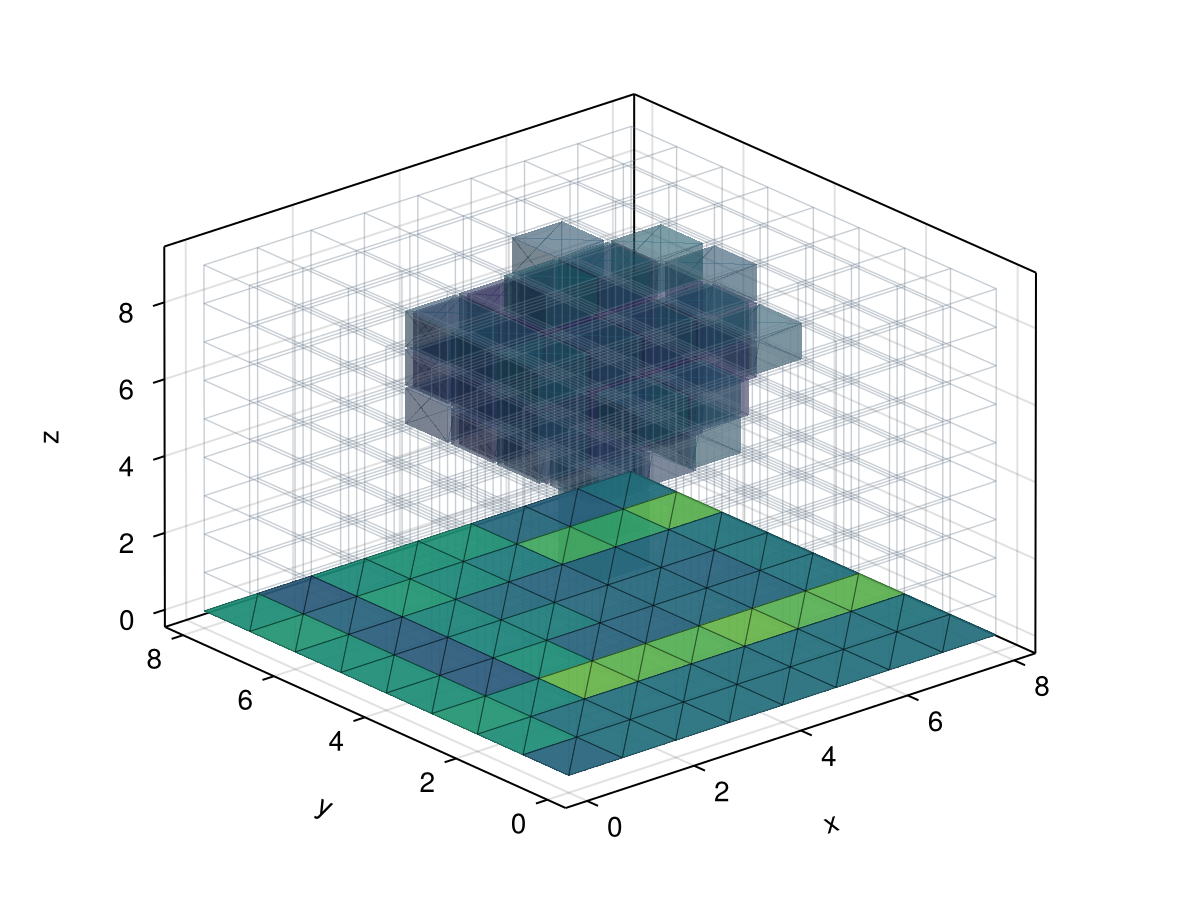
Choose The Representation-Specific Resolution#
| Setting | Triangles | Voxels |
|---|---|---|
| Spatial integration | LightOptions(pixel_size=...) | VoxelCPUBackend(rays_per_voxel=...) |
| Vegetation materials | models_for by scene group/type | models_for defaults and individual/organ overrides |
| Scattering defaults | Triangle model fallbacks can apply | Supply global or per-individual materials explicitly |
| Terrain | Soil geometry in the scene | Continuous terrain attached to VoxelScene |
| Geometry updates | update_scene! on a simulation | Import the next PAD scene and run its next period |
pixel_size does not refine voxel sampling. Match ray density and sky sectors to the required accuracy independently of the grid resolution. When PAD changes, use the Successive PAD Files workflow: build fresh caches for each state and reuse them during its period.
On this page