Assemble a Scene
This page shows the recommended way to build a scene from:
plants imported from files (
.opfor.gwa)plants generated in Julia with the growth API
optional ground geometry
TLDR: Use the make_scene function. It creates the scene root, places objects, relabels node ids, and returns a prepared SceneGeometry.
Recommended API
using PlantGeom
using MultiScaleTreeGraph
using CairoMakie

include(joinpath(pkgdir(PlantGeom), "docs", "src", "getting_started", "tree_demo_helpers.jl"))

files_dir = joinpath(pkgdir(PlantGeom), "test", "files")

imported = read_opf(joinpath(files_dir, "simple_plant.opf"); mtg_type=NodeMTG)
generated = build_demo_tree_with_growth_api()

scene = make_scene(domain=(0.0, 0.0, 8.0, 4.0)) do sc
    add_plant!(
        sc,
        imported;
        group="imported",
        id=1,
        at=(1.0, 1.0, 0.0),
        rotation=0.25,
    )

    add_plant!(
        sc,
        generated;
        group="generated",
        id=2,
        at=(4.7, 1.4, 0.0),
        scale=1.15,
        rotation=-0.35,
        inclination_angle=0.12,
    )

    add_ground!(sc; nx=8, ny=4, group="ground", type="Ground")
end

f, ax, p = plantviz(scene.mtg, figure=(size=(920, 620),))
f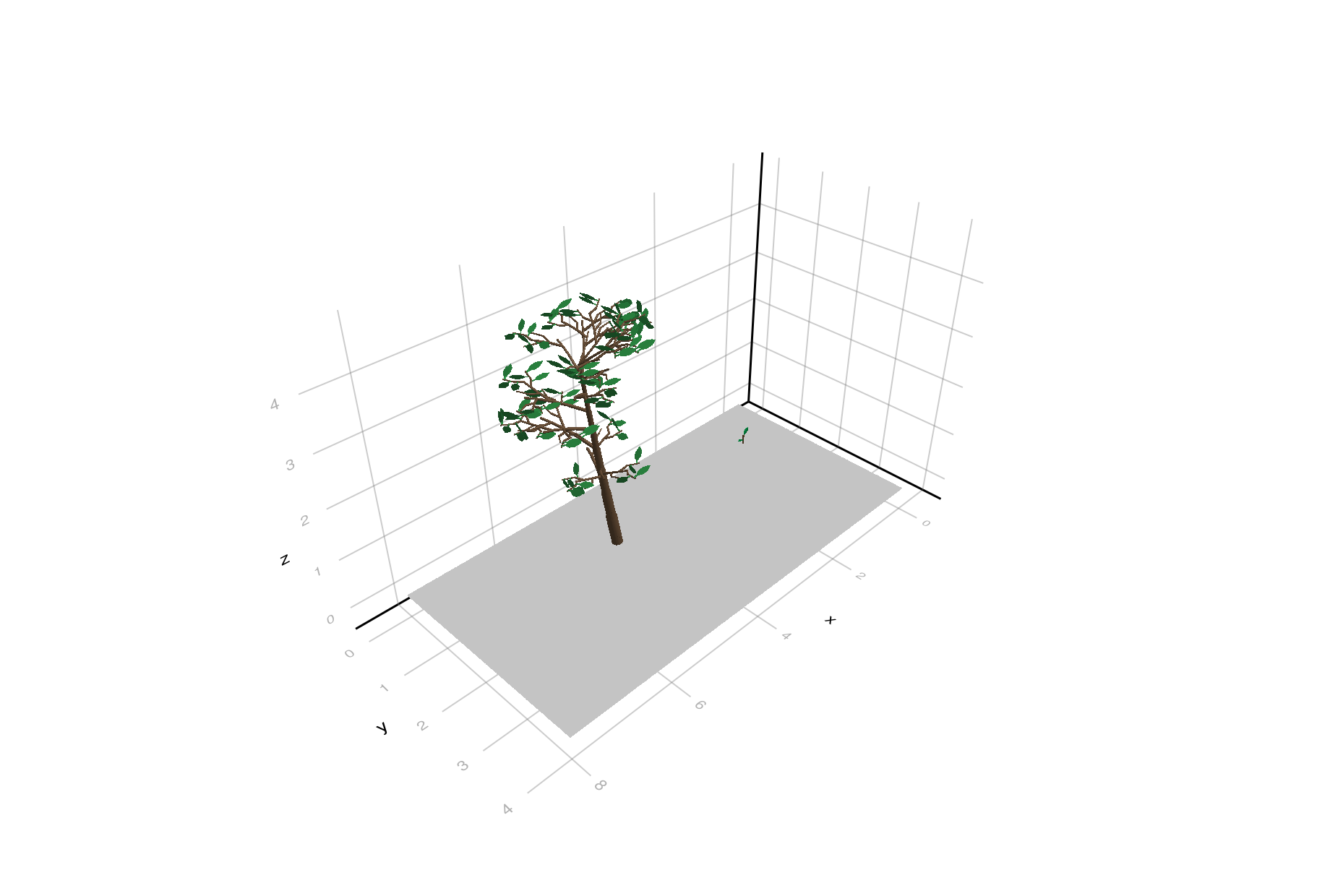
The domain is (xmin, ymin, xmax, ymax) in scene coordinates. It is also used as the default ground extent when you call add_ground! inside the builder block.
Coordinate Units
PlantGeom keeps mesh coordinates and geometry summaries as plain numeric arrays for predictable performance. A SceneUnits value records how those numbers must be interpreted; it does not wrap every coordinate in a Unitful quantity. Scenes use metres by default:
using Unitful

scene = make_scene(
    domain=(0.0, 0.0, 500.0, 300.0),
    units=SceneUnits(length=u"cm"),
) do sc
    # `at` and the domain are in centimetres. `read_opf` has already converted
    # this plant to metres, so declare that source unit explicitly.
    add_plant!(
        sc,
        read_opf("plant.opf"),
        group="plants",
        id=1,
        at=(100.0, 50.0, 0.0),
        geometry_length_unit=u"m",
    )
end

scene_length_unit(scene) # u"cm"
scene_area_unit(scene)   # u"cm^2"
geometry_length_unit belongs to each inserted object because one scene may combine sources with different conventions. PlantGeom computes one conversion factor before traversing that object, then applies transformations in this order:
scene placement ∘ unit conversion ∘ existing geometry transformThis means an existing geometry translation is converted with the object, while at, domain, and ground coordinates are already in the scene unit. If geometry_length_unit is omitted or equals the scene unit, PlantGeom adds no conversion transform.
Geometry created after insertion
Unit conversion is applied once to geometry that exists when add_plant! or add_object! runs. The source unit is not stored as a rule and is not replayed by prepare_scene or scene refreshes, because replaying it would rescale existing organs twice. Geometry emitted later must therefore be created directly in the scene unit.
The file readers have distinct boundaries:
read_opfconverts historical OPF centimetres to numeric metres by default. Add that result to a metre scene withoutgeometry_length_unit, or declaregeometry_length_unit=u"m"when the target scene uses another unit.read_opf(...; coordinate_scale=1.0)preserves OPF coordinate numbers. If those numbers represent centimetres, usegeometry_length_unit=u"cm"when adding the object.read_gwapreserves the numeric coordinates stored in the GWA file. Declare their physical unit explicitly whenever it differs from the scene unit.prepare_scene(mtg; units=...)is metadata-only. It never guesses or rescales coordinates that are already assembled.
Units are not serialized in OPF or OPS
SceneUnits belongs to SceneGeometry; it is not written into the MTG, OPF, GWA, or OPS formats. The default write_opf convention treats numeric PlantGeom coordinates as metres and writes OPF centimetres. write_ops likewise has no scene-unit field. Normalize a non-metre scene to metres before an OPS round trip. For a standalone OPF written from another numeric convention, choose coordinate_scale explicitly and retain that convention outside the file.
Add Objects
Use add_plant! for plant-like MTGs and add_object! for standalone objects (like solar panels, or buildings).
oak = read_opf("plants/oak.opf"; mtg_type=NodeMTG)
bench = read_gwa("objects/bench.gwa"; mtg_type=NodeMTG)

scene = make_scene(domain=(0.0, 0.0, 10.0, 6.0)) do sc
    add_plant!(
        sc,
        oak;
        group="trees",
        id=1,
        at=(2.0, 2.0, 0.0),
        rotate=(z=20.0,),
        deg=true,
    )

    add_object!(
        sc,
        bench;
        group="furniture",
        id=10,
        type="Bench",
        at=(6.0, 1.5, 0.0),
        scale=0.8,
    )
end
In mixed scenes, use the same MTG encoding type for the scene root and imported objects. By default, make_scene creates a NodeMTG scene root. If your objects use MutableNodeMTG, pass the same type to make_scene:
oak = read_opf("plants/oak.opf"; mtg_type=MutableNodeMTG)

scene = make_scene(domain=(0.0, 0.0, 10.0, 6.0); mtg_type=MutableNodeMTG) do sc
    add_plant!(sc, oak; group="trees", id=1)
end
Placement (e.g. add_plant!) can use the simple transform API:
at=(x, y, z)scale=sorscale=(sx, sy, sz)rotate=(x=..., y=..., z=...)deg=truewhen rotation angles are in degrees
It can also use OPS-style placement:
rotation=...inclination_azimut=...inclination_angle=...
Do not mix rotate= with OPS-style rotation= / inclination_*= placement in the same object call.
Reusing the Same Object More Than Once
add_plant! and add_object! copy MTG inputs before attaching them, so the same loaded object can be reused safely:
base_plant = read_opf("myplant.opf"; mtg_type=NodeMTG)

scene = make_scene(domain=(0.0, 0.0, 5.0, 3.0)) do sc
    add_plant!(sc, base_plant; group="plants", id=1, at=(0.0, 0.0, 0.0))
    add_plant!(sc, base_plant; group="plants", id=2, at=(2.0, 0.0, 0.0))
end
Each insertion receives its own source-instance namespace. Consequently, two copies may keep the same object-local node ids without colliding in downstream models.
Trace Geometry Back to Botanical Organs
A scene contains several distinct kinds of identity:
a scene MTG node id identifies the copied and possibly relabelled scene node;
source_topology_idis optional provenance copied from the input topology;SourceOwnerKeyidentifies the botanical source object that owns a geometric component.
Use source_owner or source_owners when results calculated on scene components must be assigned back to botanical organs:
for scene_node_id in scene_node_ids(scene)
    owner = source_owner(scene, scene_node_id)
    # Compile `owner` to the corresponding object in the downstream model.
end
The complete SourceOwnerKey is the identity. Its source_instance_id distinguishes repeated insertions and independent input topologies, while its source_node_id identifies the owner inside that source object. The key is scene-local: do not persist either integer alone as a globally stable botanical identifier, and do not infer ownership from mesh-face order.
By default, every geometry-bearing node owns its own component. Compound organs can provide a resolver when they are inserted. For example, leaflet meshes can be owned by their enclosing Leaf:
function nearest_leaf(node)
    current = node
    while MultiScaleTreeGraph.symbol(current) !== :Leaf
        MultiScaleTreeGraph.isroot(current) &&
            error("No Leaf ancestor found for scene geometry")
        current = MultiScaleTreeGraph.parent(current)
    end
    return current
end

scene = make_scene(domain=(0.0, 0.0, 5.0, 3.0)) do sc
    add_plant!(
        sc,
        compound_plant;
        group="plants",
        id=1,
        source_owner=nearest_leaf,
    )
end
Several scene nodes may then share one owner key. The mapping survives copying, placement transforms, scene-node relabelling, and later scene preparation. Calling add_plant! or add_object! again preserves an existing botanical mapping by default while assigning the copy a fresh source-instance namespace; passing a new source_owner resolver recomputes it explicitly.
prepare_scene records private _scene_* attributes on the scene MTG to retain this information across refreshes and organogenesis. PlantGeom's OPF writer omits these implementation attributes. Moving an already stamped node between two source instances is deliberately rejected: such a move would change the meaning of its owner key. Reassemble or reinsert the complete object when a new source-instance identity is intended; reparenting within the same source instance remains supported.
Compile owners to PlantSimEngine objects
When PlantSimEngine is loaded, compile_source_owner_map turns the scene-local owner keys into validated PlantSimEngine object identities. The default is intentionally strict: the model must have been constructed from the exact scene.mtg, not a copy with coincidentally equal numeric ids.
using PlantSimEngine

model = CompositeModel(scene.mtg; status=initial_status)
PlantSimEngine.Advanced.refresh_bindings!(model)

owner_map = compile_source_owner_map(scene, model)
leaf_id = owner_map[SourceOwnerKey(1, 42)]
The returned map is read-only. Its keys are sorted by (source_instance_id, source_node_id), and lookup is a cached dictionary operation. Several scene components sharing one owner produce one map entry; several distinct owner keys may also map to the same PlantSimEngine object when that is the explicit model design.
An assembled radiative scene and a physiological model do not always own the same MTG root. In that case, provide the exact registered source root for each scene instance:
owner_map = compile_source_owner_map(
    scene,
    model;
    source_roots=Dict(
        1 => exact_first_plant_root,
        2 => exact_second_plant_root,
    ),
)
For a non-MTG ownership scheme, use object_resolver=key -> object. Its result may be a registered Object, Status, exact MTG node, ObjectId, or raw id; PlantSimEngine always validates it through object_id. source_roots and object_resolver are mutually exclusive. In particular, never construct an ObjectId directly from key.source_node_id: that integer is meaningful only inside its source-instance namespace.
The compiled map records weak references to the exact scene MTG and model, along with their scene and topology revisions. Reuse it while:
source_owner_map_iscurrent(owner_map, scene, model)returns true. Geometry refreshes, organogenesis, removal, or reparenting make the map stale. Refresh PlantSimEngine bindings after a lifecycle change, then compile a new map at that lifecycle barrier. Lookup and freshness checks are allocation-free on the steady-state path; neither performs an MTG traversal.
Export to OPS
make_scene returns a SceneGeometry. The MTG scene root is stored in scene.mtg:
write_ops("mixed_scene.ops", scene.mtg)This will:
write the OPS scene table
emit one object file per child of the scene root
preserve the final placed geometry when you read the OPS back with
read_ops
Inspect Prepared Scene Geometry
The returned SceneGeometry also contains a merged mesh and per-node geometry summaries:
scene.merged_mesh
scene_node_ids(scene)
node_areas(scene)
node_barycenters(scene)
This representation is useful when a downstream model needs one mesh plus a map from faces back to MTG node ids.
Advanced: Manual Scene Roots
A lower-level API is also available when you need explicit control over the scene root or want to work directly with OPS placement metadata. In that case, create a :Scene root yourself and attach objects with place_in_scene!.
using PlantGeom
using MultiScaleTreeGraph
using GeometryBasics

scene = Node(NodeMTG(:/, :Scene, 1, 0))
scene.scene_dimensions = (
    Point{3,Float64}(0.0, 0.0, 0.0),
    Point{3,Float64}(8.0, 4.0, 0.0),
)

imported = read_opf("simple_plant.opf"; mtg_type=NodeMTG)

place_in_scene!(
    imported;
    scene=scene,
    scene_id=1,
    plant_id=1,
    functional_group="imported",
    at=(1.0, 1.0, 0.0),
    rotation=0.25,
)
For each object root, place_in_scene! writes scene metadata compatible with OPS:
sceneIDplantIDfunctional_groupposscalerotationinclinationAzimutinclinationAngleoptionally
filePath
And by default it also:
computes the same placement transform used by
read_opsapplies it to all geometry nodes in the object subtree
stores that transform as
scene_transformationrelabels node ids when attaching the object to a scene so independent trees do not collide
Two separate objects often both start at node id 1, so relabeling matters when you attach multiple roots under one scene.
MTG Type Constraint
Scene assembly attaches multiple independent MTG roots under one :Scene root. Those roots must use the same MTG encoding type.
The simplest mixed-scene workflow is:
create or let
make_scenecreate aNodeMTGscene rootread imported OPF/GWA objects with
mtg_type=NodeMTGbuild generated plants with the growth API, which already uses
NodeMTG
If your input objects use MutableNodeMTG, call make_scene(...; mtg_type=MutableNodeMTG) and load all imported objects with mtg_type=MutableNodeMTG.
If you mix NodeMTG and MutableNodeMTG roots in the same manual scene, addchild! will fail.
When Not To Build A Scene
If you only want a single standalone plant/object, keep it as an object-local MTG and write it directly with write_opf or write_gwa.
Build a scene only when the object is meant to live inside a larger spatial assembly.